This post contains affiliate links. If you buy through them, I may earn a commission at no extra cost to you. Read the disclosure.
Quick verdict: Otter AI has the most generous free plan of the meeting note takers I have tested: 300 minutes a month, and you can download your transcript, summary and audio. It is fast and easy to use. But it only transcribes six languages, so it cannot handle Hindi or Urdu, and in my test its summary got the budget and a name wrong.
Best for: students, freelancers and small teams with English-only meetings · Not for: meetings in Hindi, Urdu or a mix of Urdu and English · From: $8.33/month billed yearly, or $16.99 month to month · My score: 4 out of 5
In this Otter AI review, I share what happened when I tested Otter on the free Basic plan on 16 October 2026. I used the same recorded test meeting I use for every meeting tool, with dates, a budget, names and action items, plus one line in Hindi and one in Urdu. Then I checked the transcript, the AI summary, Otter AI Chat, the export options and the free plan limits.
I ran the exact same recording through Fireflies on the same day, so you can see how the two compare on identical audio. You can read the full results in my Fireflies AI review.
How I tested Otter AI for this review
I recorded voice notes on my phone, joined them into one MP3 file (English first, then Hindi, then Urdu) and uploaded it with Otter’s Import button, with the language set to English (US). On the free plan you only get 3 imports for the life of your account, so one combined file used just one of them. I did not test the meeting bot joining a live call this time.
- Test date
- 16 October 2026
- Plan
- Basic (free), no trial, no card
- Method
- 1 recorded file imported (1 min 45 s): English, then Hindi, then Urdu, one speaker
- English script
- “Good morning everyone. This is a test meeting for AI Tool Wise. Today we have three agenda items. First, the website launch on November 15. Second, a budget of $250 for new tools. Third, Ali will write two reviews by Friday. Ahmed, can you send the report to me by 5 PM? Our next meeting is on Monday at 10:30.”
- Also tested
- A mixed Roman Urdu and English line, AI Chat, export and download, free plan limits
You can read how I test every tool on my How I test page.
What is Otter AI?
Otter.ai is an AI meeting assistant and transcription app. Its notetaker can join Zoom, Microsoft Teams and Google Meet calls, you can record in the Otter app on the web, iOS or Android, or you can import a recording. Otter then writes a transcript with speaker labels and an AI summary, and you can ask questions about your meetings with Otter AI Chat.
Otter only transcribes six languages: English (US and UK), Spanish, French, German, Japanese and Chinese (Simplified), according to its help center. The import window says “7 languages supported” because it lists US and UK English separately. Plan details are on the official Otter pricing page.
Otter AI accuracy in English: my test results
Otter got most of my English script right, including the date and the meeting time, and it kept “launch on” correctly. But it made two mistakes that matter in a real meeting: it turned the budget into a different number and it replaced a name.
| What I said | What Otter wrote | Result |
|---|---|---|
| the website launch on November 15 | the website launch on November 15 | Correct |
| Monday at 10:30 | Monday at 10:30 | Correct |
| a budget of $250 | a budget of two $50 | Wrong |
| Ahmed, can you send the report… | Emma, can you send the report… | Wrong name |
| AI Tool Wise | AI tool-wise | Close |
| should we test Fireflies and Otter | should we taste fireflies and water | Wrong |
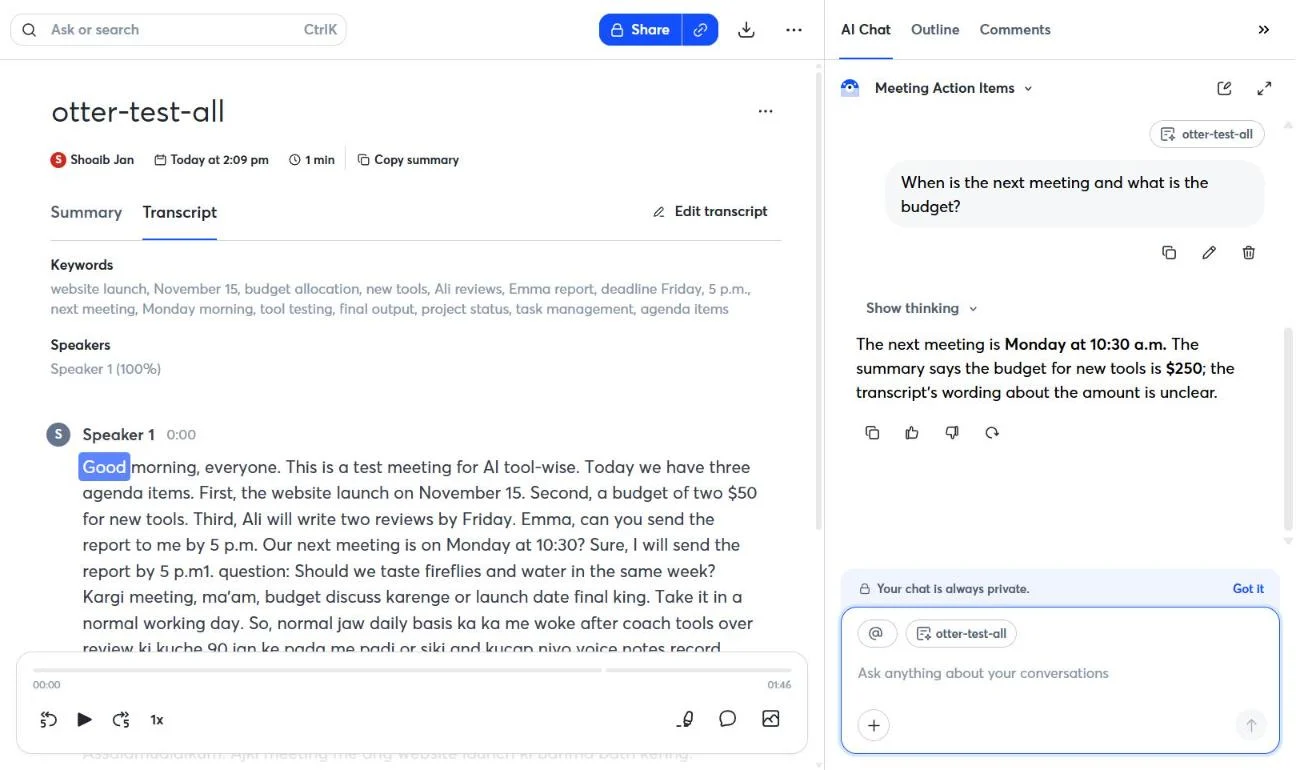
The transcript was ready in under a minute, and Otter added keywords and speaker labels at the top. With one speaker it correctly showed “Speaker 1 (100%)”.
Otter AI summary, action items and AI Chat
The summary was neatly organized into Key Decisions, Meeting Details and Unresolved Items. It got the November 15 launch, Ali’s two reviews by Friday and the Monday 10:30 meeting right. But it carried over the transcript’s mistakes: it said “a budget of $50 has been allocated” and “Emma is tasked with sending a report by 5 p.m.” It did fix one error by itself, writing “test Fireflies and Water” instead of “taste”.
The Action Items list stayed empty, even though the meeting had two clear tasks.
AI Chat did better. When I asked “What are the action items from this meeting?”, it listed Ali’s reviews and the report, still giving the report to “Emma”. When I asked “When is the next meeting and what is the budget?”, it said Monday at 10:30 a.m. and that “the summary says the budget for new tools is $250”. But the summary on the same page says $50. AI Chat contradicted Otter’s own summary.
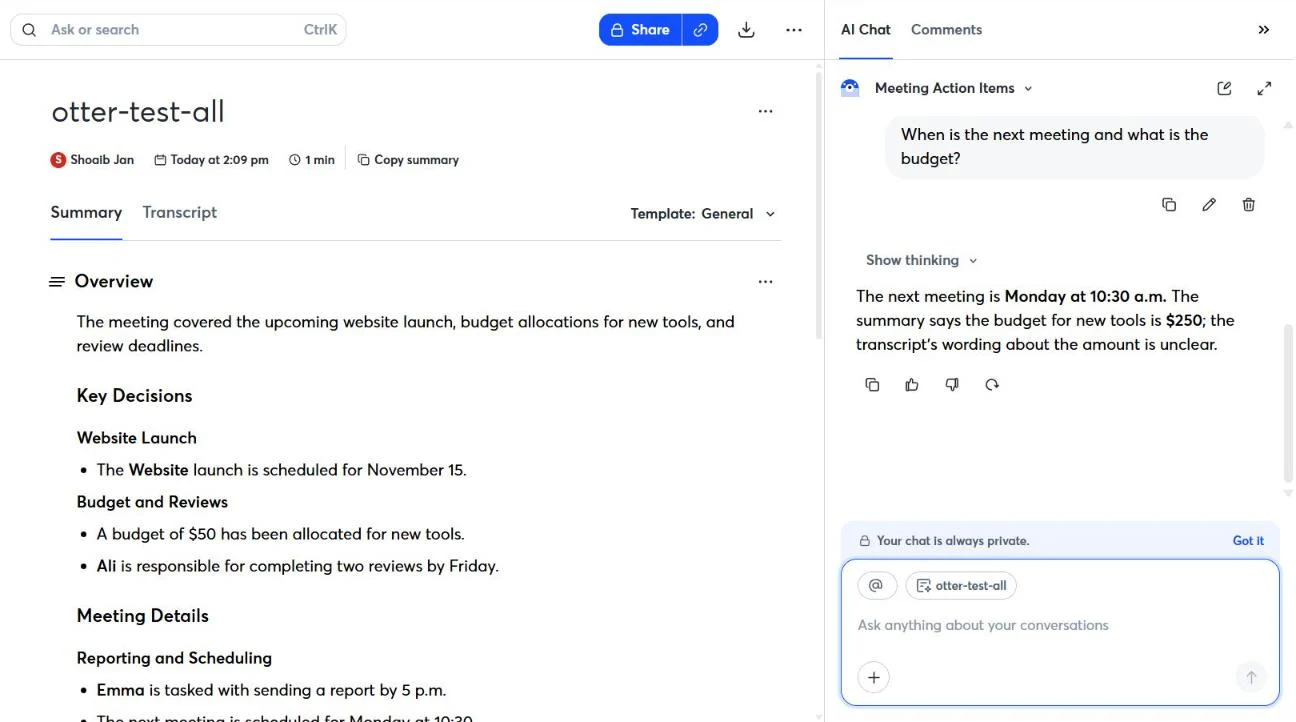
Tip: never forward an Otter summary without checking numbers and names against the transcript. In my test, both the budget and a name were wrong in the summary.
Otter Hindi and Urdu test
Otter does not support Hindi or Urdu, and my test showed what that means in practice. With the language set to English, it wrote my Hindi and Urdu lines as rough Roman-letter sounds instead of the real words, for example “Namaste aj ki meeting me website launch ki bari membahad kering”. You can guess what was said if you speak the language, but you cannot search, share or summarize it properly.
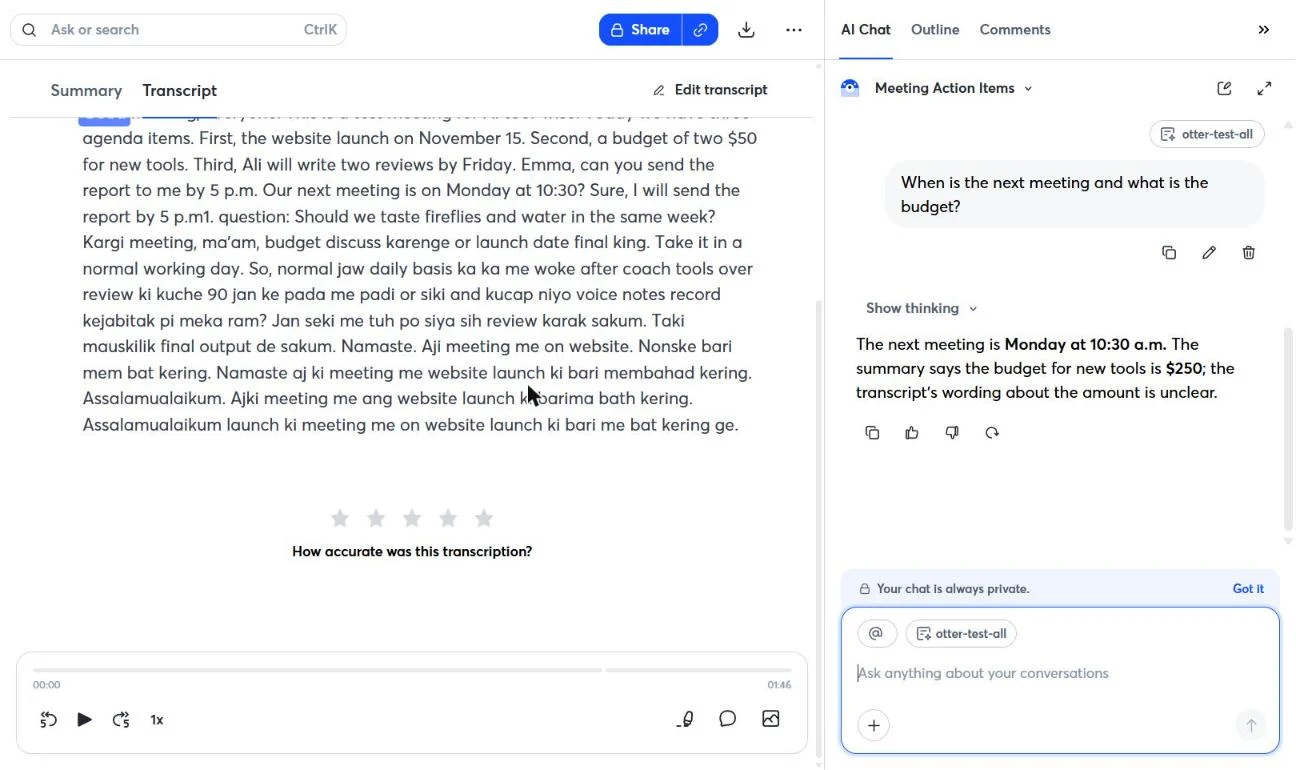
The mixed Roman Urdu line went a little better than in Fireflies. I said “Kal ki meeting mein hum budget discuss karenge, aur launch date final karenge”, and Otter wrote “Kargi meeting, ma’am, budget discuss karenge or launch date final king”. The English words survived and the Urdu words came out as sounds. My half minute of free talk in mixed Urdu and English turned mostly into nonsense, with only a few words like “voice notes record” and “final output” recognizable.
Bottom line for Pakistan and India: if any of your meetings are in Hindi or Urdu, Otter is the wrong tool. Fireflies wrote both languages correctly in their own scripts in the same test.
For a full comparison of four tools on the same Urdu recording, see my Urdu speech to text test.
Otter free plan: limits and exporting
Otter’s free plan is called Basic, and it is more useful than most free plans in this category.
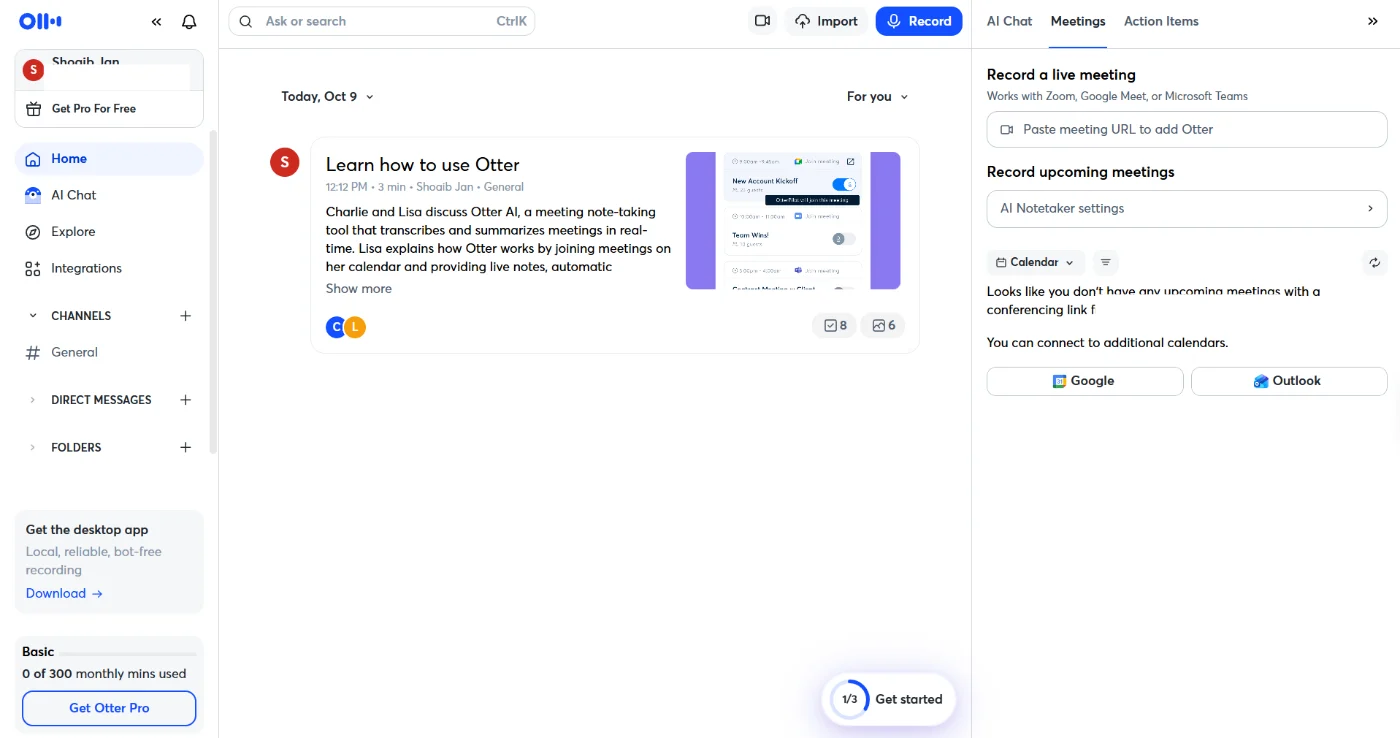
- 300 transcription minutes a month, shared between meetings, recordings and imports. My 1 min 45 s test used 2 minutes.
- 30 minutes per conversation. Longer meetings are cut off, which is the biggest limit for real work calls.
- 3 file imports for the life of your account, not per month. After my test it showed “2 of 3 imports left”.
- Only the 25 most recent conversations are kept in your history, and AI Chat is limited to 20 questions a month (3 per conversation).
- Playback at 1x only, 5 custom vocabulary words and 1 meeting at a time.
Exporting works on the free plan. The Export window let me choose the summary (overview, action items, outlines) and the transcript (with speaker names and timestamps). It downloaded a ZIP with the transcript and summary as TXT files plus an MP3 of the audio. The audio is compressed: my 1 min 45 s file was only 308 KB. The free transcript also ends with the line “Transcribed by https://otter.ai”. PDF, DOCX and SRT exports are listed under the Pro plan on the pricing page.
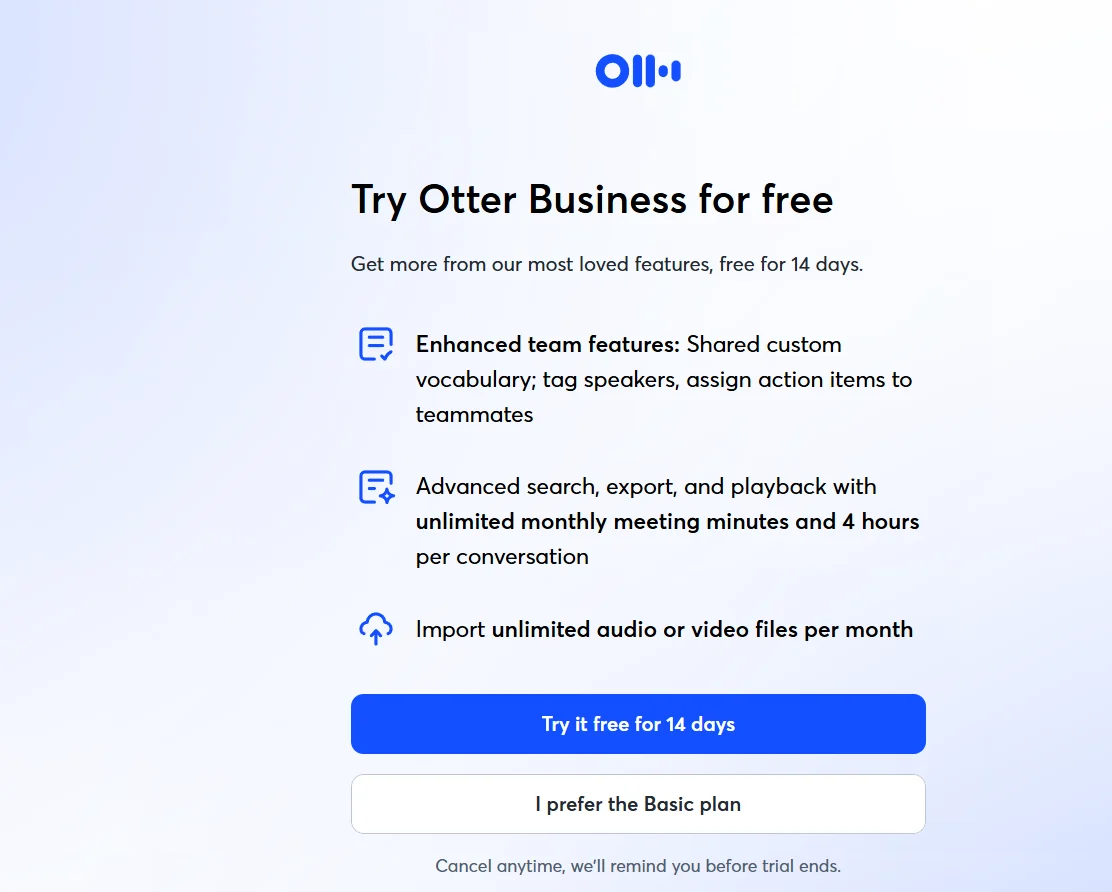
Watch out: right after signup, Otter offers a 14-day Business trial. Its help center says a credit card is required and that the card is charged the Business monthly rate when the trial ends, unless you cancel. Otter also says it does not offer refunds. Click I prefer the Basic plan to stay free.
Otter AI pricing in 2026
Prices checked on Otter’s official pricing page on 16 October 2026. Prices are per user, in US dollars, and taxes may be added depending on your country.
| Plan | Monthly billing | Yearly billing | Key limits |
|---|---|---|---|
| Basic | $0 | $0 | 300 min a month, 30 min per meeting, 3 imports for life, txt and mp3 export |
| Pro | $16.99/month | $8.33/monthabout $100 per year | 1,200 min a month, 90 min per meeting, 10 imports a month, PDF, DOCX and SRT export |
| Business | $30/month | $19.99/monthabout $240 per year | Unlimited meetings, 4 hours per meeting, 6,000 import minutes, 3 meetings at once |
| Enterprise | Custom (book a demo) | SSO, security controls, Otter API | |
On monthly billing, the pricing page also showed offers for first-time subscribers: Pro at $8.49 a month (50% off) and Business at $24 a month for the first 3 months. Students and teachers with a .edu email get 20% off Pro. Payment is by card or through the App Store or Google Play; PayPal is not accepted yet.
Which plan to choose: for one person, Pro on yearly billing is the best value. It removes the 30-minute cap and adds better exports. Business only makes sense for teams that need long meetings and unlimited imports.
Otter AI pros and cons
Pros
- Generous free plan: 300 minutes a month with no card needed
- Free exports of the transcript, summary and audio
- Fast: my transcript was ready in under a minute
- Dates and times in my English test were right
- Mixed Roman Urdu and English came out readable for the English words
Cons
- No Hindi or Urdu: only six languages are supported
- Turned $250 into “$50” and replaced a name in the summary
- The Action Items list stayed empty
- AI Chat contradicted Otter’s own summary
- 30-minute limit per meeting and only 3 lifetime imports on the free plan
Who should use Otter (and who should skip it)
If Otter isn’t the right fit, I’ve tested several Otter AI alternatives with the same meeting recording, including tools that handle Urdu and Hindi.
Otter is a good fit if your meetings are in English and you want a free tool you can use every week. Students, freelancers and small teams with short calls will get the most from the Basic plan, and the free exports mean your notes stay yours.
Skip Otter if any of your meetings are in Hindi, Urdu or a mix of Urdu and English, if your meetings usually run longer than 30 minutes and you do not want to pay, or if you need accurate numbers in summaries without checking them yourself.
Otter vs Fireflies: the same audio, different results
I uploaded the same recordings to Fireflies on the same day. Here is how the two compared; every detail is in my Fireflies vs Otter comparison.
| Test | Otter | Fireflies |
|---|---|---|
| “$250” | “two $50” | Correct |
| Hindi and Urdu | Not supported (rough Roman letters) | Correct, in native scripts |
| Mixed Roman Urdu line | Written phonetically in Roman letters | Mostly lost |
| Action items list | Empty | 1 of 2 tasks |
| Downloads on free plan | Transcript, summary and audio (txt, mp3) | Locked |
| Free allowance | 300 minutes a month, 30 minutes per meeting | 3 meetings |
| Cheapest paid plan | $16.99 monthly or $8.33 yearly | $18 monthly or $10 yearly |
In short: Otter’s free plan is more generous and cheaper to upgrade, while Fireflies was more accurate and handles Hindi and Urdu.
What other reviewers say about Otter
To give you the full picture, I compared my test with what users and other reviewers say about Otter.
| Source | Rating | Notes |
|---|---|---|
| G2 | 4.4/5 (505 reviews) | User reviews, mostly businesses |
| MeetJamie | 7/10 | Says summaries can be vague or inaccurate and support is slow. Note: MeetJamie makes a competing app. |
Why my score (4.0) is a little lower than G2: most G2 reviewers use Otter for English meetings, often on paid plans. I tested the free plan and weigh what matters to readers in Pakistan and India: Hindi and Urdu support, mixed-language meetings and summary accuracy. Otter’s generous free plan and free exports earn it a solid score, but no Hindi or Urdu and the wrong budget in its summary cost it points.
Ratings checked on 16 October 2026.
Need Hindi or Urdu? Otter supports neither. Notta wrote my Urdu in proper Urdu script; see my Notta AI review.
Otter AI review FAQ
Is Otter AI free?
Yes. The Basic plan is free forever and needs no card. It gives you 300 transcription minutes a month, up to 30 minutes per conversation, and 3 file imports for the life of your account.
Does Otter support Hindi or Urdu?
No. Otter transcribes only English, Spanish, French, German, Japanese and Chinese (Simplified). In my test it wrote Hindi and Urdu as rough Roman-letter sounds. For Hindi or Urdu meetings, Fireflies worked much better.
Can I download transcripts on the Otter free plan?
Yes. In my test, the free plan exported the transcript and summary as TXT files and the audio as an MP3 in one ZIP. PDF, DOCX and SRT exports are listed under Pro.
How much is Otter Pro?
$16.99 a month on monthly billing, or $8.33 a month billed yearly (about $100 a year), per user, as checked on 16 October 2026. First-time subscribers may see a discount on monthly billing.
Is Otter or Fireflies better?
For English meetings on a free plan, Otter is better value: more minutes and free exports. If your meetings include Hindi or Urdu, or you need accurate summaries, Fireflies did better in my test.
Is this Otter review sponsored?
No. Otter did not pay for this review or see it before it was published. I tested it on my own free account. Some links on this page are affiliate links; see my affiliate disclosure.
Comparing more note takers? See my best AI note taker list, where Otter, Fireflies and Notta get the same test meeting.
Final verdict: is Otter AI worth it?
To sum up this Otter AI review: Otter is worth it for English meetings, especially if you want a free tool. The Basic plan gives you 300 minutes a month and free exports, and the transcript was fast. But it does not support Hindi or Urdu, and its summary got the budget and a name wrong in my test, so always check the numbers before you share notes.
My score: 4 out of 5. Choose Otter for English-only meetings on a budget. If your meetings are in Hindi or Urdu, read my Fireflies AI review instead.
Looking for more tools? Browse all my AI tool reviews.
Sources checked for this Otter AI review
All facts below were checked on 16 October 2026. Plans and limits change often, so confirm on the official pages before you buy.
- Otter pricing page: plan prices, minutes, imports, export formats
- Otter help: supported languages: the six transcription languages
- Otter help: Business free trial: card required, charged when the trial ends
- Otter help: cancel a subscription: cancellation and no refunds
- G2 Otter.ai reviews: user ratings
- My own hands-on test of Otter on the free Basic plan, 16 October 2026