This post contains affiliate links. If you buy through them, I may earn a commission at no extra cost to you. Read the disclosure.
Quick verdict: For Urdu speech to text, Notta was the best tool in my test. It was the only one that wrote my Urdu recording in proper Urdu script, both lines, word for word. ElevenLabs was the most accurate with English names and numbers, but it wrote my Urdu in Hindi (Devanagari) script, which most Pakistani readers can’t read. Fireflies dropped half of my Urdu, and Otter doesn’t support Urdu at all.
Best for Urdu script: Notta · Most accurate overall: ElevenLabs · Skip for Urdu: Otter · Free option: Notta, 120 minutes a month
Most “Urdu speech to text” pages just list tools that say they support Urdu. I wanted to know which ones actually work. So I recorded my own voice in Urdu, Hindi, English and the mixed Roman Urdu we all speak in meetings, and ran the same recordings through four popular AI transcription tools: Notta, ElevenLabs, Fireflies and Otter.
The results surprised me. A tool can “support Urdu” and still give you a transcript you can’t read. Below are the real transcripts, screenshots and my honest ranking.
Urdu speech to text: quick comparison of 4 tools
| Tool | Urdu recording | Hindi recording | Mixed Hinglish talk | English names | Download on free plan |
|---|---|---|---|---|---|
| Notta | Urdu script, both lines | Perfect | Clear | 2 mistakes | No |
| ElevenLabs | Right words, but Hindi script | Perfect | Clear | Best (1 name unclear) | Export button available |
| Fireflies | Urdu script, but 1 of 2 lines missing | Perfect | Gibberish | 2 mistakes | No |
| Otter | Not supported (rough Roman letters) | Not supported | Gibberish | 3 mistakes | Yes (mp3, txt) |
“Clear” means the words were right, but written in Devanagari with English words mixed in. I explain why that matters below.
How I tested Urdu speech to text
- Test dates
- 16 October 2026 (Fireflies, Otter) and 19 October 2026 (Notta, ElevenLabs)
- Plans
- Free plan of every tool
- Audio
- My own voice, recorded as WhatsApp voice notes and converted to MP3
- Urdu file (13 s)
- “السلام علیکم، آج کی میٹنگ میں ہم ویب سائٹ لانچ کے بارے میں بات کریں گے۔” said twice
- Hindi file (12 s)
- “नमस्ते, आज की मीटिंग में हम वेबसाइट लॉन्च के बारे में बात करेंगे।” said twice
- English file (1:15)
- A short English meeting script with names (Ali, Ahmed), dates, times and a $250 budget, then a mixed Roman Urdu line and about 30 seconds of free talk in Urdu/Hinglish
- Language setting
- Picked by hand for every file (Urdu, Hindi or English)
I used the same three files in every tool except Otter, which only accepts English and a few other languages, so it got one combined file. That way every tool heard exactly the same voice, accent and background noise.
1. Notta: the best Urdu speech to text tool in my test
My score: 4.4/5. Notta was the only tool that gave me a transcript in proper Urdu script with nothing missing. Both repetitions of my line came back word for word:
“السلام علیکم! آج کی meeting میں ہم website launch کے بارے میں بات کریں گے۔”
Notice that “meeting” and “website launch” are written in English letters. That is actually how most of us mix English into Urdu, so it reads naturally.
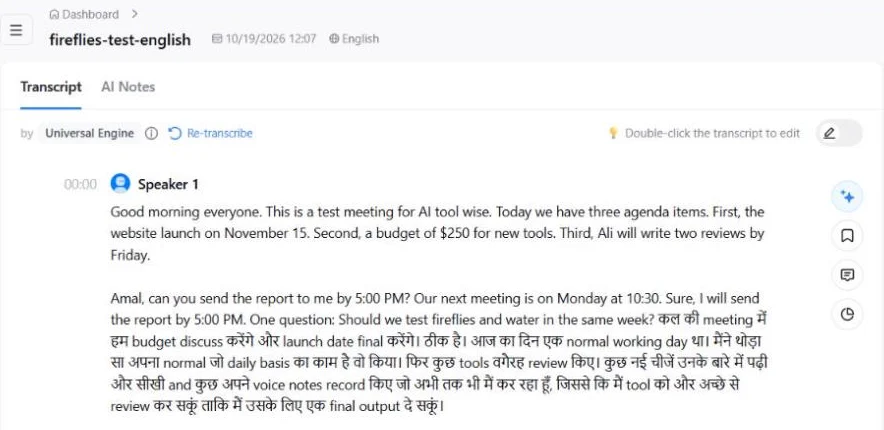
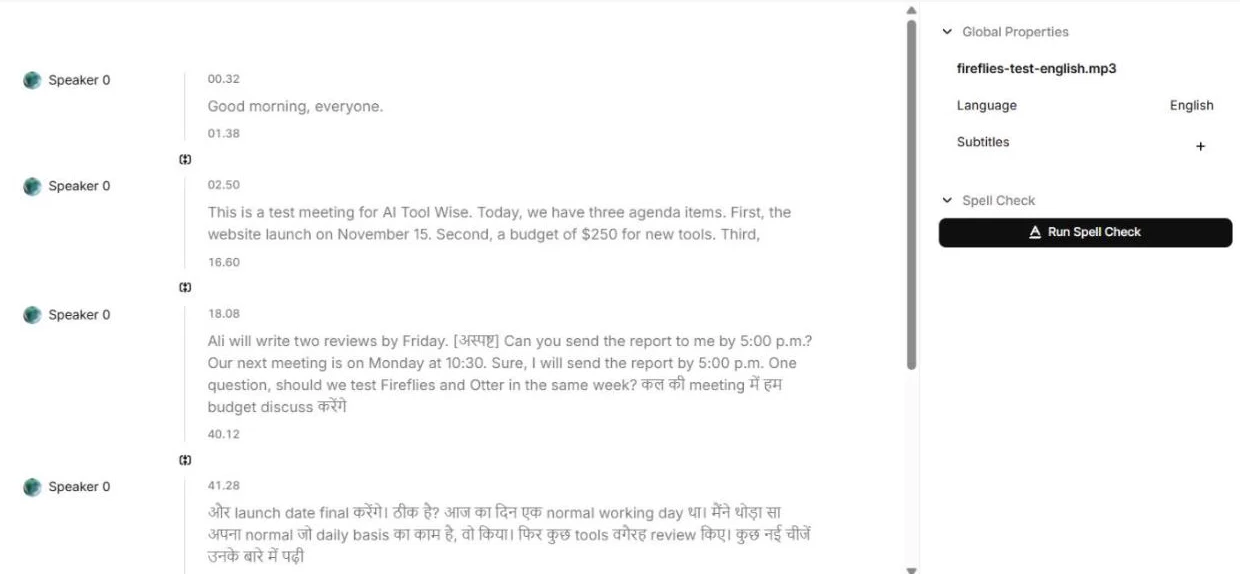
The Hindi file was perfect too, in Devanagari. In the English file, the numbers were all right (November 15, $250, 5:00 PM, Monday at 10:30) and so was “Ali”. It made two mistakes: “Ahmed” became “Amal”, and “Otter” became “water”. The mixed and free Urdu/Hinglish talk at the end came out clean, but written in Devanagari with English words.
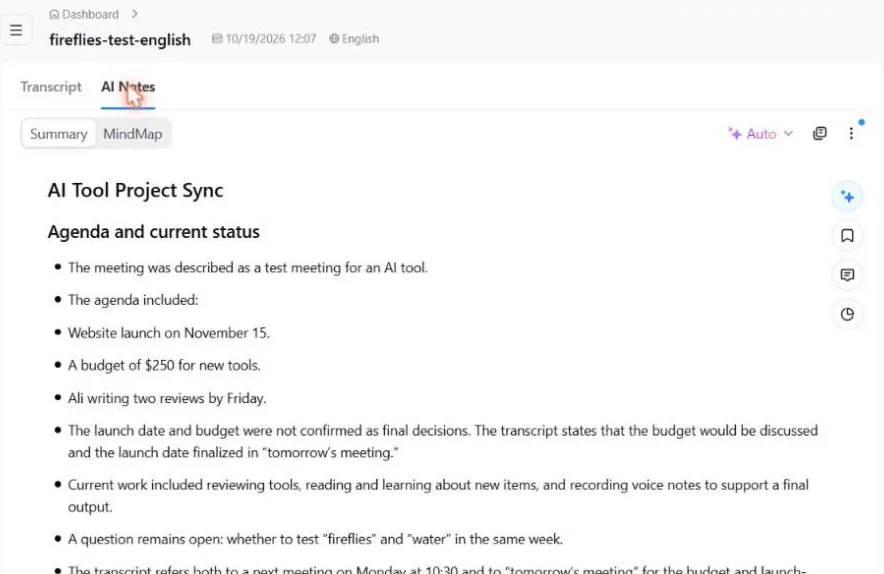
The free AI summary was useful. It picked up the agenda, the budget and the deadline, and it even understood the Hindi/Urdu part (“the budget would be discussed and the launch date finalized in tomorrow’s meeting”). It did repeat the “water” mistake from the transcript.
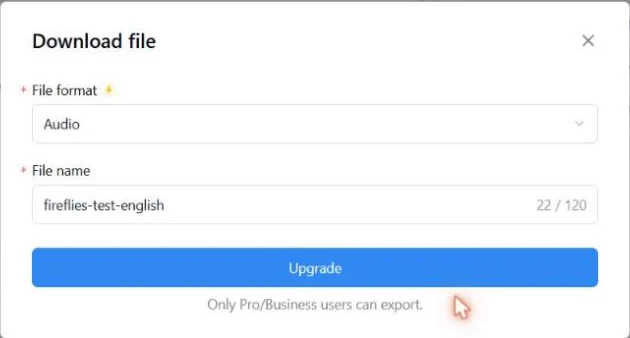
Watch out: on the free plan you can read and copy the transcript, but you can’t download it. When I tried, Notta said “Only Pro/Business users can export.” The free plan also stops at 3 minutes per recording.
Pros
- Only tool that wrote my Urdu in proper Urdu script, complete
- Hindi and Hinglish came out clean
- Useful AI summary on the free plan
- Urdu and Hindi are in its official list of 58 languages
Cons
- Got 2 English words wrong (a name and a tool name)
- No download on the free plan
- Free recordings are limited to 3 minutes each
Notta pricing checked on its official pricing page on 19 October 2026: Free (120 transcription minutes a month, up to 3 minutes per conversation, 50 file uploads, 10 AI summaries a month); Pro $8.17/month billed yearly ($97.99 a year, 1,800 minutes, up to 5 hours per recording); Business $16.67/month billed yearly ($199.99 a year).
2. ElevenLabs Speech to Text: most accurate, but Urdu comes out in Hindi script
My score: 4.4/5. ElevenLabs is best known for AI voices (see my ElevenLabs review), but it also has a Speech to Text tool called Scribe. For English it was the most accurate tool I tested. It got “AI Tool Wise”, “Fireflies and Otter”, every number and “Ali” right. The only miss was “Ahmed”, which it marked as unclear instead of guessing a wrong name.
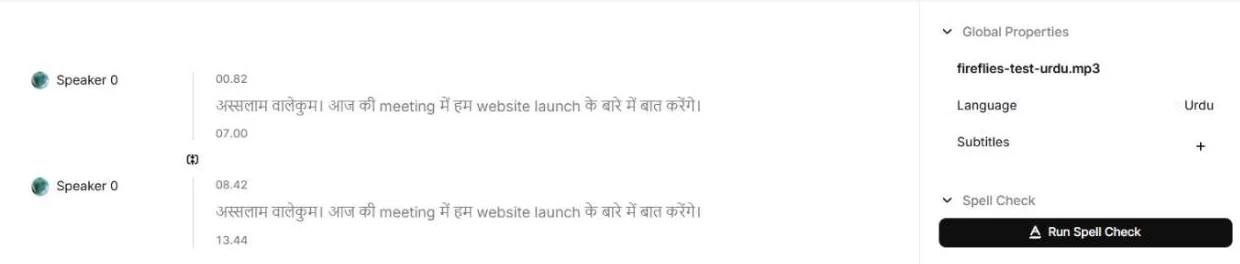
But here is the big problem for Urdu users. Even with the language set to Urdu, ElevenLabs wrote my Urdu recording in Hindi (Devanagari) script:
“अस्सलाम वालेकुम। आज की meeting में हम website launch के बारे में बात करेंगे।”
The words are correct, but if you read Urdu and not Hindi, like most people in Pakistan, you can’t use this transcript. I can’t read Devanagari myself, so for my own Urdu work this would not help.
ElevenLabs’ own documentation is honest about this. It puts Hindi in its “High Accuracy” group, but Urdu only in the “Moderate” group, with an expected word error rate between 25% and 50%.
Watch out for credits: on the free plan, Speech to Text used about 14 credits per second of audio in my test (187 credits for 13 seconds, 1,045 for 75 seconds). The free 10,000 monthly credits cover only about 12 minutes of transcription, and the same credits are shared with text to speech.
Pros
- Most accurate English: names, tool names and numbers
- Marks unclear words instead of inventing them
- Hindi and Hinglish came out clean
- Clear timestamps for each part
Cons
- Wrote my Urdu in Hindi script, even with Urdu selected
- Urdu is only in the “Moderate” accuracy group
- Uses free credits fast
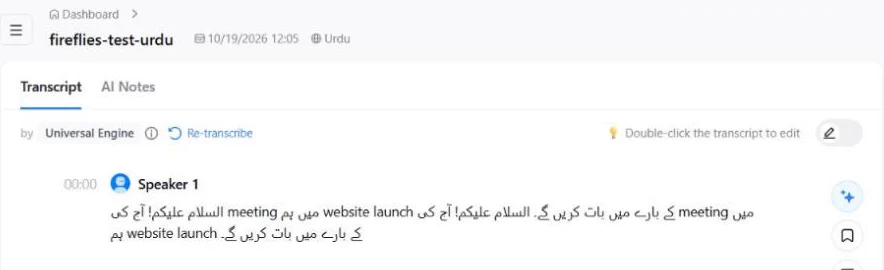
3. Fireflies: Urdu script, but half my Urdu was missing
Fireflies wrote my Urdu in proper Urdu script, which is good. But I said the line twice and only one came back. Hindi was perfect. The real problem was mixed talk: my free Urdu/Hinglish speech at the end of the English file became gibberish, and Fireflies could not make a summary of the Hindi or Urdu files (“Meeting does not have enough transcript to generate a summary”).
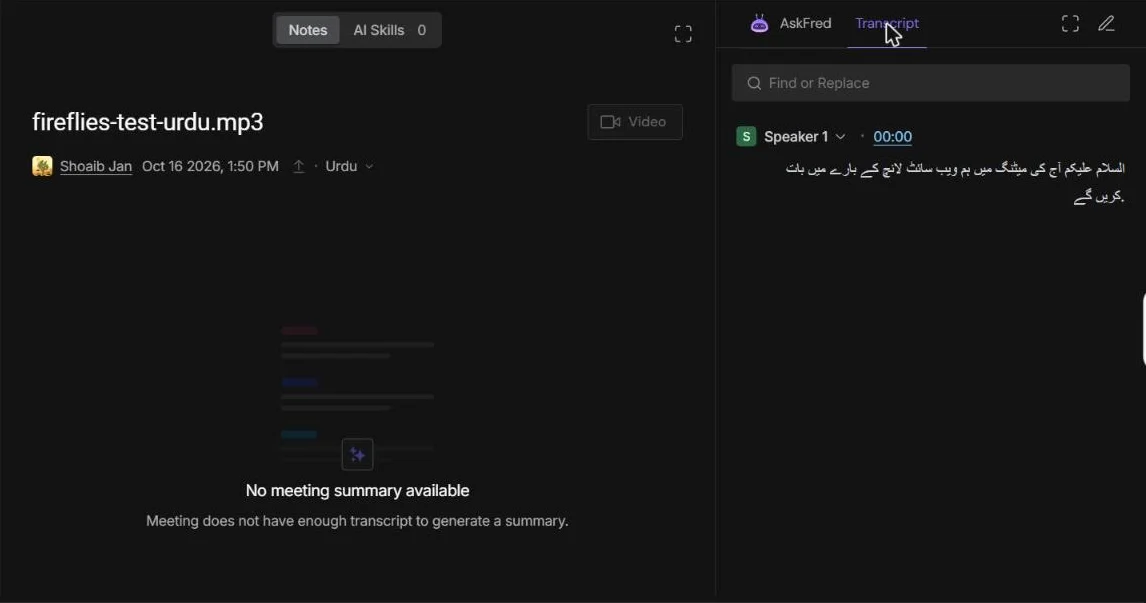
Fireflies is still a strong meeting assistant for English calls. My full score for it is 4.5/5 in my Fireflies review, but for Urdu it comes behind Notta. Downloads are locked on its free plan.
4. Otter: no Urdu support at all
Otter only transcribes English, Spanish, French, German, Japanese and Chinese. Hindi and Urdu are not on the list. When I gave it my recording anyway, it turned Hindi and Urdu into rough Roman-letter sounds such as “Namaste aj ki meeting me website launch ki bari membahad kering”. Even in English it got “$250” and “Ahmed” wrong.
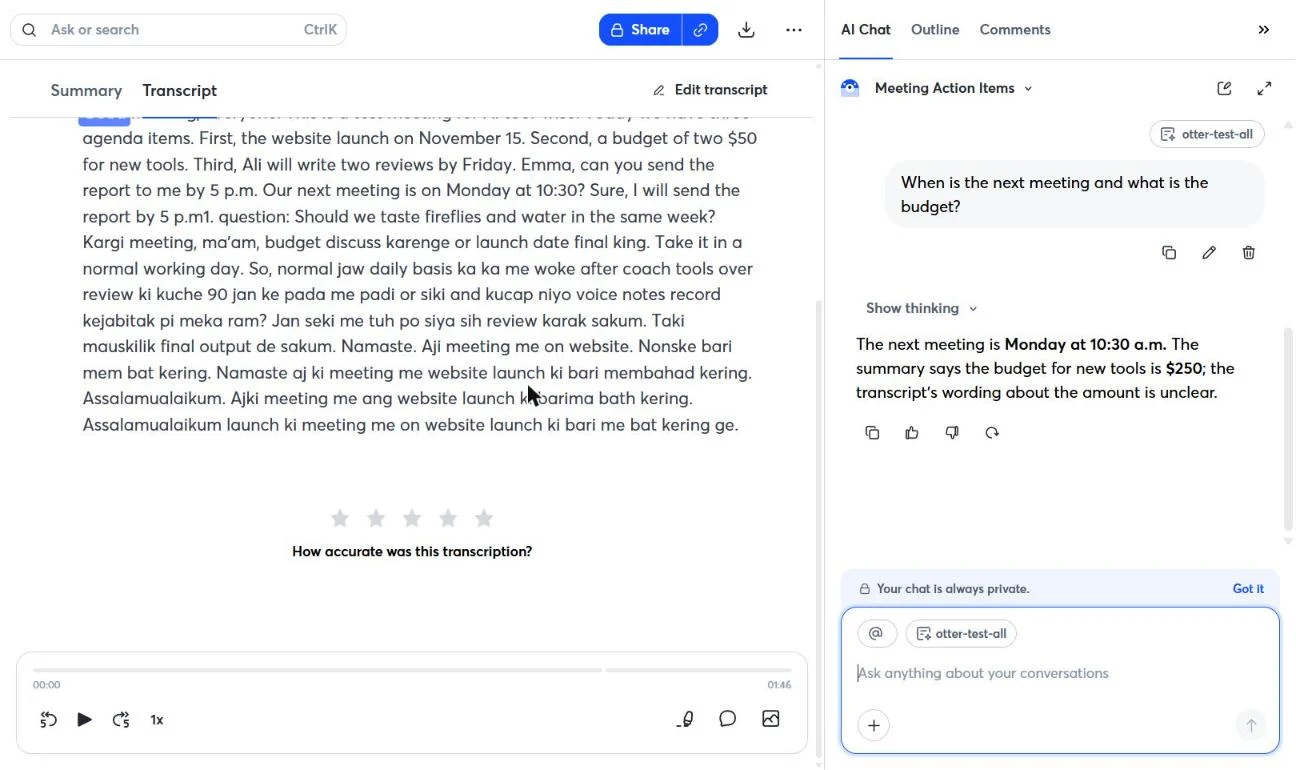
If your meetings are in English only, read my Otter review and my Fireflies vs Otter comparison. For Urdu, skip it.
Why “supports Urdu” is not enough: the script problem
Spoken Urdu and Hindi sound almost the same, so a speech to text tool can hear the right words and still write them in the wrong script. That is exactly what happened with ElevenLabs on my Urdu file, and with both Notta and ElevenLabs on my mixed Hinglish talk (when the file language was set to English).
For a reader in Pakistan, a transcript in Devanagari is about as useful as no transcript. So before you pay for any tool, do what I did: upload one short Urdu clip on the free plan, set the language to Urdu, and check that the result is in Urdu script.
Tip: always pick the language yourself instead of relying on auto-detect. I set Urdu, Hindi or English by hand for every file. I haven’t tested auto-detect or long mixed meetings with the Urdu setting yet, so test those with your own audio first.
Which Urdu speech to text tool should you choose?
- You need Urdu script (notes, captions, documents for Urdu readers): Notta.
- Your meetings are mostly English with some Hinglish, and you or your team can read Devanagari: ElevenLabs for the best accuracy.
- English-only team meetings with a bot that joins calls: Fireflies. See my Fireflies review.
- Urdu or Hindi in any form: skip Otter.
Cheapest paid plans, from each official pricing page: Notta Pro $8.17/month billed yearly (checked 19 October 2026); ElevenLabs Starter $6/month, credit-based (19 October 2026); Fireflies Pro $10 per seat/month billed yearly (6 October 2026); Otter Pro $8.33/month billed yearly (9 October 2026).
Urdu speech to text FAQ
Is there a free Urdu speech to text tool?
Yes. Notta’s free plan gives you 120 minutes a month (up to 3 minutes per recording) and it wrote my Urdu in proper Urdu script. ElevenLabs also works on its free plan, but its credits run out after about 12 minutes of audio and Urdu came out in Hindi script.
Which tool writes Urdu in Urdu script?
In my test, Notta (complete) and Fireflies (one line missing). ElevenLabs wrote Urdu in Devanagari, and Otter doesn’t support Urdu.
Does ElevenLabs support Urdu speech to text?
Yes, Urdu is in its language list, but in the “Moderate” accuracy group. In my test the words were right but the script was Hindi, even with Urdu selected.
Can these tools handle Roman Urdu or Hinglish meetings?
Notta and ElevenLabs understood my mixed Urdu/English talk well, but wrote it in Devanagari with English words. Fireflies and Otter turned it into gibberish.
Is this Urdu speech to text test sponsored?
No. I tested every tool on its free plan with my own account and my own voice. Some links are affiliate links, which never change my results. Read my affiliate disclosure.
Final verdict: the best Urdu speech to text tool
To sum up this Urdu speech to text test: Notta is the one I’d use for Urdu. It was the only tool that gave me a complete transcript in Urdu script, and the free plan is enough to try it. ElevenLabs is the most accurate for English and Hinglish, but its Urdu comes out in Hindi script. Fireflies is good for English meetings but weak in Urdu, and Otter doesn’t support Urdu at all.
Sources checked for this Urdu speech to text test
Facts below were checked on the dates shown. Plans change often, so confirm on the official pages before you buy.
- Notta pricing page: free plan limits and paid plans (19 October 2026)
- Notta help center: supported languages: 58 languages including Urdu and Hindi (19 October 2026)
- ElevenLabs Speech to Text documentation: language list and accuracy groups (19 October 2026)
- ElevenLabs pricing page (19 October 2026)
- Fireflies pricing page (6 and 16 October 2026)
- Otter pricing page (9 October 2026)
- My own hands-on tests on the free plans: Fireflies and Otter on 16 October 2026, Notta and ElevenLabs on 19 October 2026