This post contains affiliate links. If you buy through them, I may earn a commission at no extra cost to you. Read the disclosure.
Quick verdict: Is Murf AI free? Only as a test drive. The Murf AI free plan gives you 10 minutes of voice generation once, not every month, with access to Business-plan features, but you can’t download your audio and you get no commercial rights. I used it to test Murf myself, and it’s enough to judge the voices and the editor. To actually use a voiceover anywhere, including in Canva, you need a paid plan, from $19 a month on yearly billing.
Good for: trying the voices and editor before paying · Not for: making audio you can download or publish · Cheapest paid plan: Creator, $19/month yearly or $29 monthly
“Is Murf AI free?” gets asked a lot, and the honest answer has two traps: the free minutes don’t come back each month, and the free plan won’t let you download anything. I tested Murf on the free plan myself for my Murf review, generating English and Hindi voiceovers and trying to export them. This guide covers what the Murf AI free plan really includes, what it doesn’t, how it works with Canva, and when it’s worth paying. Plan details were checked on Murf’s official pricing page and help center on 29 October 2026.
What the Murf AI free plan includes
From Murf’s official pricing page (Studio plans) and help center, checked on 29 October 2026.
| Feature | Murf free plan |
|---|---|
| Price | $0, no credit card required |
| Voice generation | 10 minutes in total |
| Do the minutes reset? | No. Murf’s help center says the free trial ends once the 10 minutes are used |
| Features | “Everything in Business Plan (No Downloads)”, per the pricing page |
| Projects | 10 |
| Editors | 1 |
| Downloads | No |
| Commercial rights | No |
The interesting part is the “Business Plan” access: on the free plan you can try features that the cheapest paid plan, Creator, doesn’t have, such as Emphasis, Variability and “Say It My Way”. That’s great for testing, but it can also make the free plan look better than the Creator plan you’d actually buy.
My Murf AI free plan test
I tested Murf Studio on the free plan in October 2026 with my standard English script, plus Hindi lines in Devanagari and Roman Hindi.
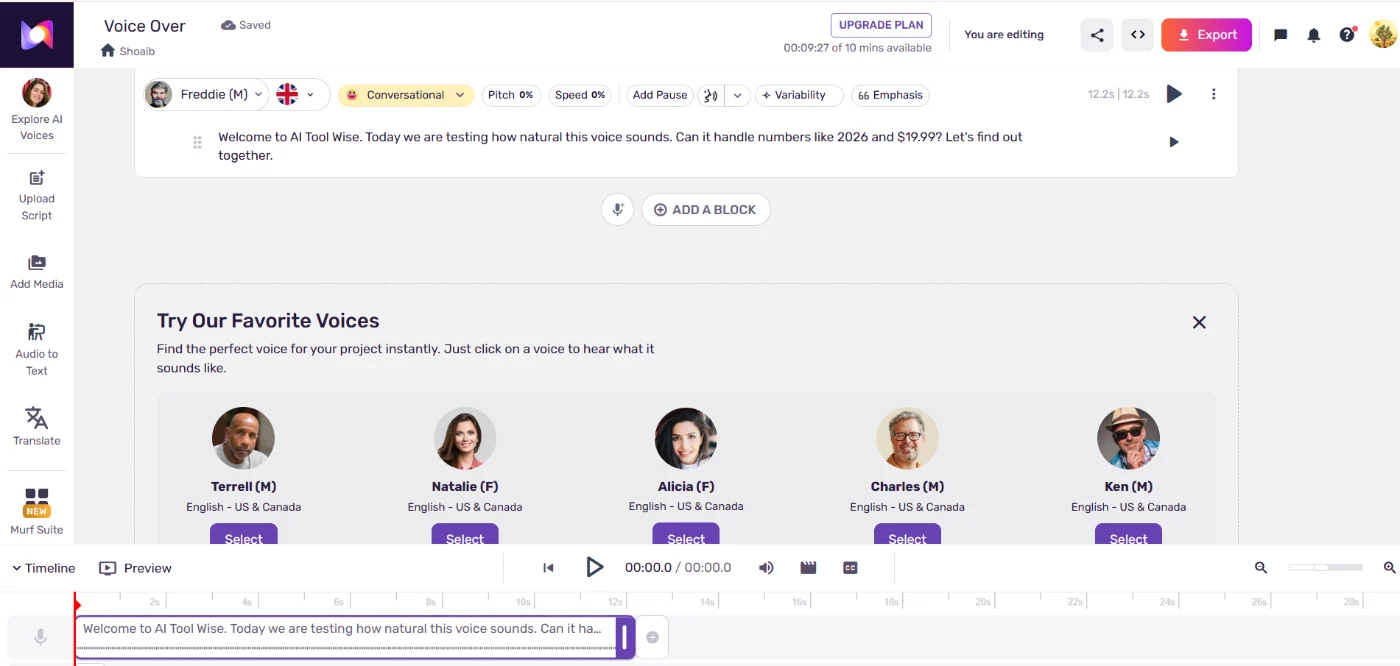
- Minutes used: my whole test used only about 33 seconds of the 10 minutes, so the free allowance is plenty to judge the voices.
- Voice quality: I scored Murf 7.5/10 for naturalness and 4/5 overall.
- Hindi: good when typed in Devanagari, poor when typed in Roman Hindi.
- Urdu: not available. Murf has no Urdu voices.

Can you download audio on the Murf free plan?
No. When I clicked Export on the free plan, Murf showed all the formats but asked me to upgrade before downloading. Murf’s help center confirms that downloading is only available on paid plans.
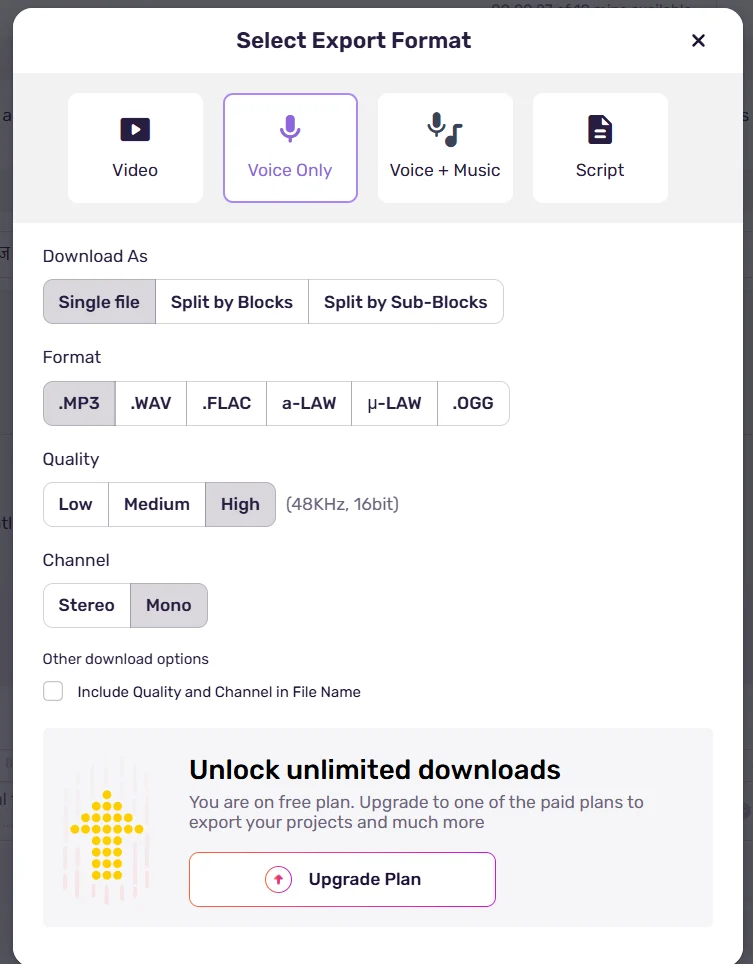
This is the biggest difference from ElevenLabs, whose free plan let me download MP3s. If you want a free plan you can actually download from, see my ElevenLabs free plan guide.
Is Murf AI free in Canva?
The Murf app is free to install in Canva, but a free Murf account can only preview voiceovers there. Murf’s help center says adding a voiceover to your Canva design “is a feature exclusive to paid plans”, and that free trial users “can create and listen to voiceover previews, but cannot add them to their projects”.
- Voiceovers made in Canva use the voice minutes of the Murf workspace you connect.
- Each Canva voiceover block can hold up to 1,000 characters, and a design can have up to 50 voiceover or audio blocks.
- Canva designs don’t count toward your Murf project limit.
So for a Canva video with a Murf voice, you need at least the Creator plan, which lists the Canva integration.
Is Murf AI free for commercial use?
No. The pricing page lists “No Commercial Rights” for the free plan, and since you can’t download on free anyway, there’s no way to use free-plan audio in a YouTube video, an ad or client work. Commercial rights start on the Creator plan.
Murf free plan vs paid plans
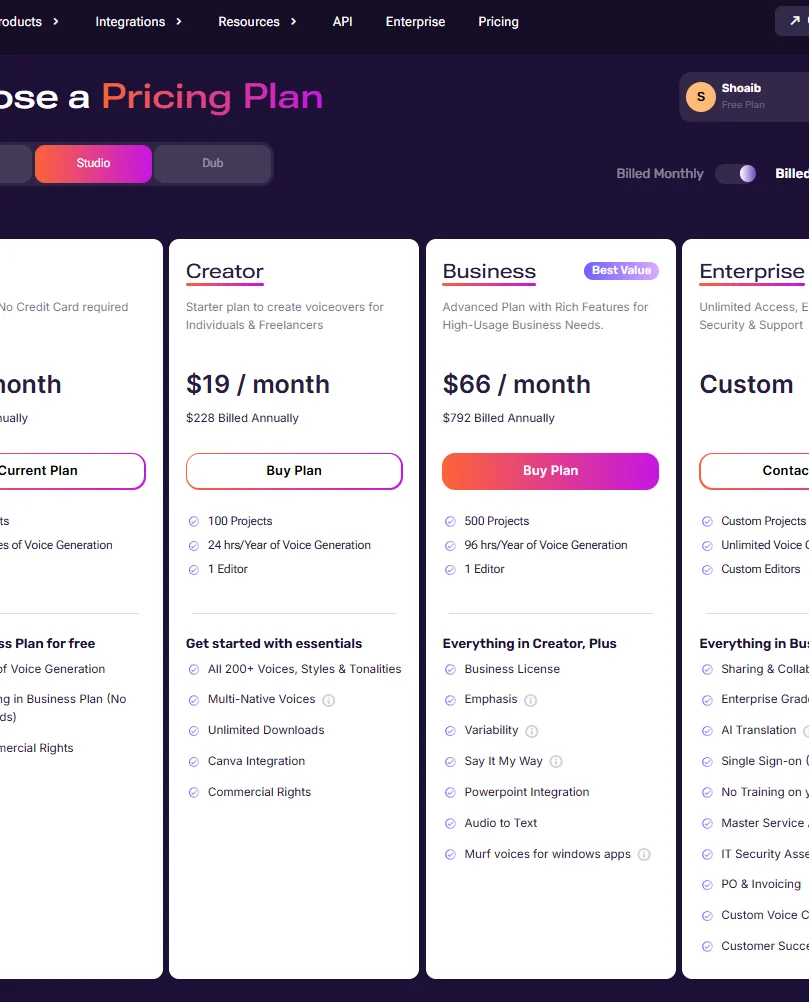
| Free | Creator | Business | |
|---|---|---|---|
| Price, yearly billing | $0 | $19/month ($228/year) | $66/month ($792/year) |
| Price, monthly billing | $0 | $29/month | $99/month |
| Voice generation | 10 minutes, one time | 24 hours/year (2 hours/month on monthly) | 96 hours/year (8 hours/month on monthly) |
| Downloads | No | Unlimited | Unlimited |
| Commercial rights | No | Yes | Yes, plus business license |
| Canva integration | Preview only | Yes | Yes |
| Emphasis, Variability, Say It My Way, PowerPoint | To try (no downloads) | No | Yes |
| Projects | 10 | 100 | 500 |
Checked on Murf’s official pricing page (Studio plans) on 29 October 2026. Taxes may apply.
Before you pay: Murf only refunds within 24 hours of purchase and if you’ve used less than 10 minutes, and it takes cards only, no PayPal. Use the free plan to pick your voice first, then buy. Full details in my Murf AI pricing guide.
Who should stay on the free plan (and who should upgrade)
- Stay free if: you’re comparing voice tools, checking whether Murf suits your accent and language, or testing the editor before a project.
- Upgrade to Creator if: you need to download audio, use it on YouTube or with clients, or add voiceovers in Canva.
- Look elsewhere if: you need Urdu, or you write Hindi in Roman letters. ElevenLabs handled both better in my tests; see my Murf vs ElevenLabs comparison.
More on the voices and editor in my full Murf AI review.
Murf AI free plan FAQ
Is Murf AI free?
Murf has a free plan with 10 minutes of voice generation, but it’s a one-time trial: the minutes don’t reset, and you can’t download audio or use it commercially.
Does the Murf AI free plan reset every month?
No. Murf’s help center says the free trial ends once the 10 minutes are used.
Can I download audio on the Murf free plan?
No. In my test the Export window asked me to upgrade, and Murf’s help center confirms downloads are for paid plans only.
Is Murf AI free in Canva?
The Canva app is free to add, but free Murf users can only preview voiceovers. Adding them to a Canva design needs a paid Murf plan.
Is Murf AI free for commercial use?
No. Commercial rights start on the Creator plan ($19/month on yearly billing, $29 monthly).
Is this Murf AI free plan guide sponsored?
No. I tested Murf on my own free account. Some links on this page are affiliate links, which means I may earn a commission at no extra cost to you. See the affiliate disclosure.
Final verdict: is the Murf AI free plan worth it?
To sum up this Murf AI free plan guide: it’s worth signing up to test, not to use. Ten minutes is plenty to hear the voices and try even the Business-plan controls, but with no downloads and no commercial rights, nothing you make on it can leave Murf. If the voices fit your work, go straight to Creator on yearly billing.
Sources checked for this Murf AI free plan guide (4)
Facts below were checked on 29 October 2026. Plans change often, so confirm on the official pages.
- Murf pricing (Studio plans): free plan, Creator and Business
- Murf help center: Canva integration: free vs paid in Canva
- Murf help center: Canva app limits: minutes, block and project limits
- My own hands-on test of Murf Studio on the free plan, October 2026