This post contains affiliate links. If you buy through them, I may earn a commission at no extra cost to you. Read the disclosure.
Quick verdict: Murf AI is an easy text-to-speech tool that turns a written script into a clean, natural-sounding voiceover in minutes. After testing it myself, I recommend it for YouTubers, Instagram reel makers, trainers and marketers who want professional narration without recording their own voice. Skip it if you need film-level voice acting, Urdu, Roman Hindi scripts, or a free plan that lets you download audio.
Best for: YouTube, reels, e-learning and presentations · Not for: film or OTT production, Urdu content · From: $19/month billed yearly, or $29 month to month · My test score: 4.0/5 · AI Tool Wise score: 4.3/5
In this Murf AI review, I share what I found after testing the tool hands-on on 1 October 2026. Using the free plan, I tried seven or eight AI voices with different accents, ran the same English test script through each one, tested Hindi in two different ways, and tried to export the audio. Below you will find my honest results on voice quality, the Murf AI free plan, every 2026 pricing plan, the real pros and cons, and exactly who should (and should not) pay for it.
How I tested Murf AI for this review
- Test date
- 1 October 2026
- Plan
- Free plan (it unlocks Business plan features for testing, without downloads)
- English script
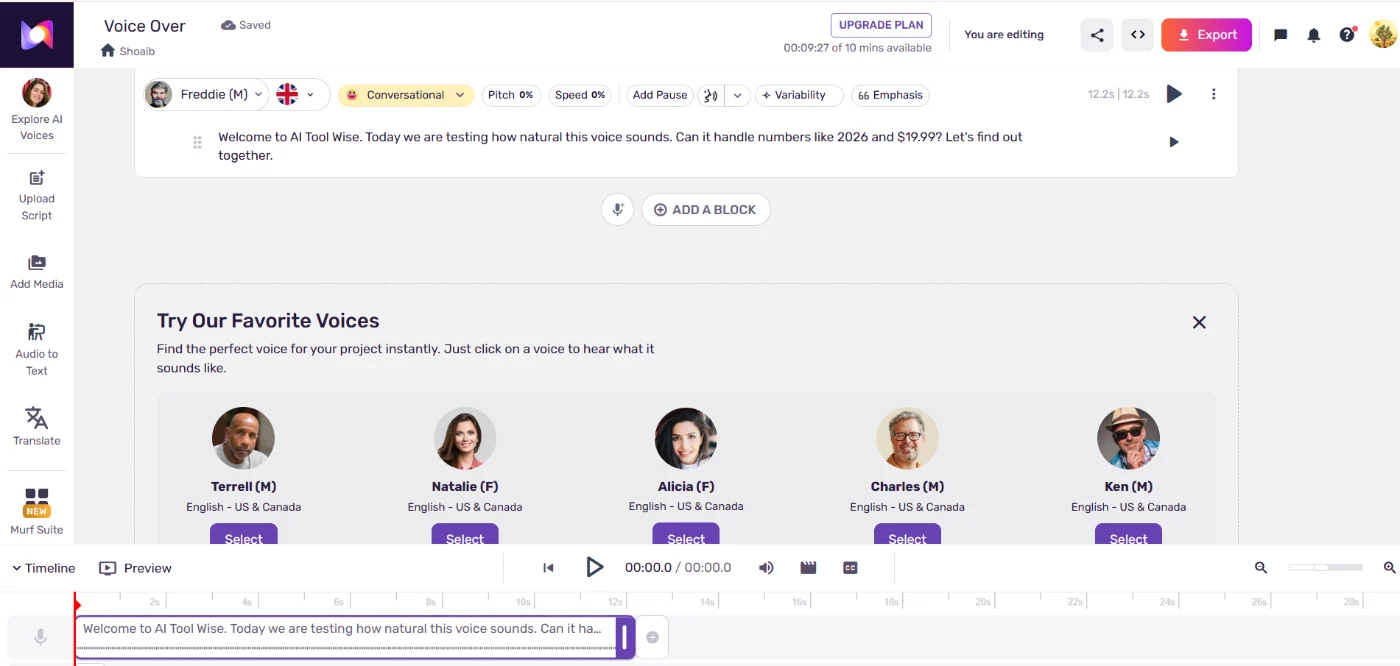
- “Welcome to AI Tool Wise. Today we are testing how natural this voice sounds. Can it handle numbers like 2026 and $19.99? Let’s find out together.”
- Hindi script
- The same kind of sentence, once in Hindi (Devanagari) and once in Roman Hindi
- Voices tried
- 7 to 8, male and female, US and UK accents
- Also tested
- Voice styles, pitch, speed, pauses, export
How is the 4.3 score calculated?
My hands-on test is the most important part of the score, but one person’s test is not the whole story. So I combine it with ratings from thousands of real users: 60% my test + 40% the average user rating.
| Source | Rating | Weight |
|---|---|---|
| My hands-on test | 4.0/5 | 60% |
| G2 | 4.7/51,411 reviews | 40% (average 4.65) |
| Trustpilot | 4.6/5186 reviews | |
| AI Tool Wise score | 0.6 × 4.0 + 0.4 × 4.65 = 4.26 → 4.3/5 | |
User ratings checked on G2 and Trustpilot on 5 October 2026. How the score works is explained on my How I test page.
What is Murf AI?
Murf is an AI voice generator. You paste or type a script, pick a voice, adjust how it speaks, and export the audio. Everything happens in a browser editor called Murf Studio, which works like a simple audio timeline: your script is split into blocks, and each block can use its own voice and settings.
According to Murf’s official pricing page, the Studio plans include 200+ voices in 30+ languages and accents. Murf also sells an API for developers and a separate dubbing product, but this review covers Murf Studio, the part most creators will use.
Murf AI voice quality: how natural does it sound?
I rate Murf AI’s voice quality 7.5 out of 10 for naturalness. The best voices sound smooth and clear, with sensible pauses and pacing, and most viewers would happily accept them in a YouTube video, an Instagram reel or an online course. They still sound slightly “produced” next to a real voice actor, especially in longer or emotional lines, so they are not a full replacement for human voice talent yet.
Pronunciation was a pleasant surprise. Murf read the tricky parts of my script correctly, saying the year “2026” and the price “$19.99” the way a person would. Many cheaper text-to-speech tools stumble on numbers and prices like these.
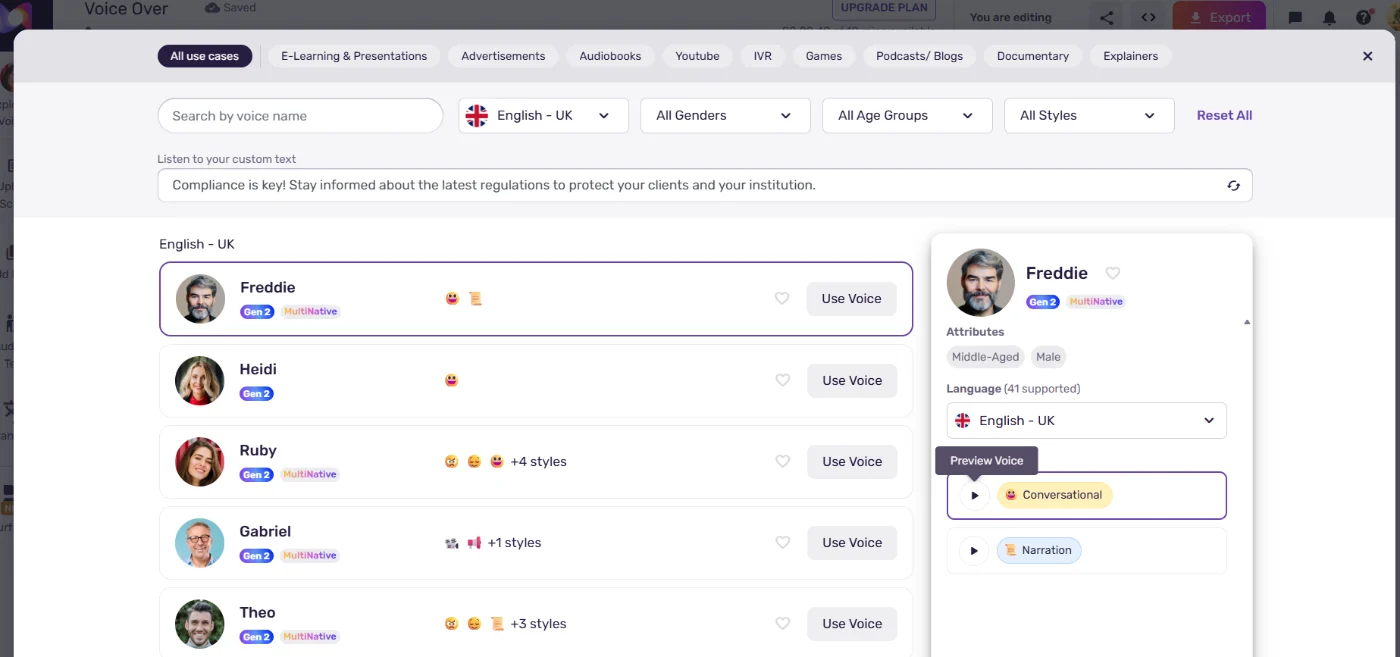
The voice library is one of Murf AI’s biggest strengths. During my test, I liked how many different voices and accents from different countries I could try. You can filter by language, accent, gender, age, style and use case (e-learning, ads, audiobooks, YouTube, podcasts and more), and preview each voice before you use it. Many voices offer several styles, such as Conversational or Narration, and some are marked “MultiNative”, meaning the same voice can speak more than one language.
Hear the voices yourself: I can’t publish my own test clips here, because Murf’s free plan doesn’t allow downloads or commercial use. You can listen to Murf’s voices on the official Murf text to speech page, where you can type a line, pick a voice and press play without signing up.
Murf AI Hindi test: Devanagari vs Roman Hindi
If you create content for Indian or Pakistani audiences, this section matters most. Most Murf AI reviews only test English, so I tested Hindi voiceovers in two common ways.
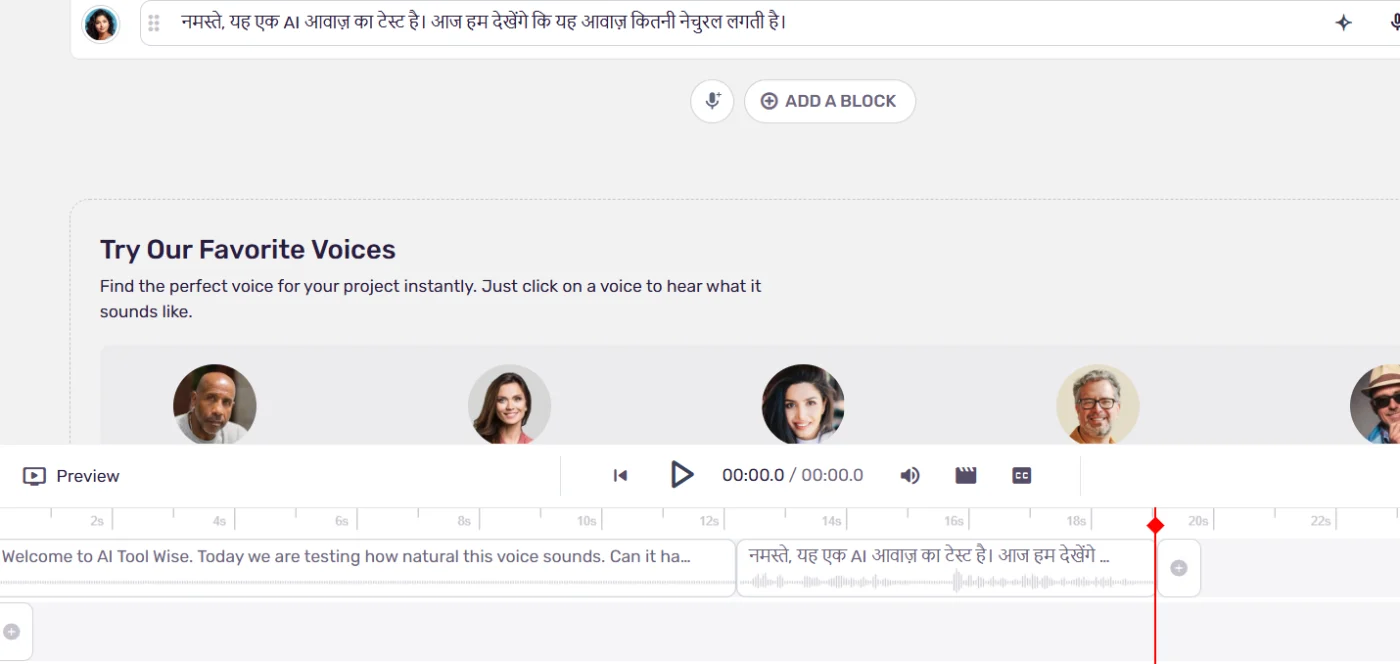
- Hindi script in Devanagari (हिंदी): the result was good. The Hindi AI voice read the sentence clearly and naturally.
- Roman Hindi (Hindi typed in English letters, the way most of us type on WhatsApp): the result was poor. Murf did not understand the Roman Hindi text well, and the output did not sound natural.
- Urdu: Urdu does not appear in the list of languages Murf supports, so I could not test it.
Tip: if you want Hindi voiceovers from Murf, write or paste your script in Devanagari script, not Roman Hindi. If you need Urdu, Murf is not the right tool today.
See how every tool I tested compares in my list of the best AI voice generator for Hindi and Urdu.
Murf Studio editor and voice controls
Murf AI is easy to use, even for beginners. I did not need a tutorial to create my first voiceover. Each block of text has a row of controls above it:
- Voice and style: switch the voice or its mood (for example Conversational or Angry)
- Pitch and Speed: make the voice deeper, higher, faster or slower
- Add Pause: insert breaks where you want the voice to breathe
- Variability and Emphasis: make delivery less flat and stress chosen words

Watch out: the free plan lets you try Business plan features. According to Murf’s pricing table, Emphasis, Variability and “Say It My Way” are Business plan features, so they are not included in the cheaper Creator plan. Something you liked during the free test may be missing if you buy Creator.
Murf AI free plan: limits and exporting audio
The Murf AI free plan is a test drive, not a free tool you can keep using. Here is what it includes and what it doesn’t:
- 10 minutes of voice generation, one time. Murf’s help center says the free trial has no end date, but it ends once the 10 minutes are used. It does not reset every day or month.
- No downloads. When I clicked Export, Murf showed the formats but asked me to upgrade. Murf’s help center confirms downloading is only available on paid plans.
- No commercial rights on the free plan.
- Up to 10 projects.
For context, my whole test used about 33 seconds of the 10 minutes, so the free allowance is enough to judge the voices properly.
The export window shows what you get once you pay: video, voice only, voice with music, or the script; formats including MP3, WAV, FLAC and OGG; and quality up to 48 kHz, 16-bit. You can export one file or split it by blocks.
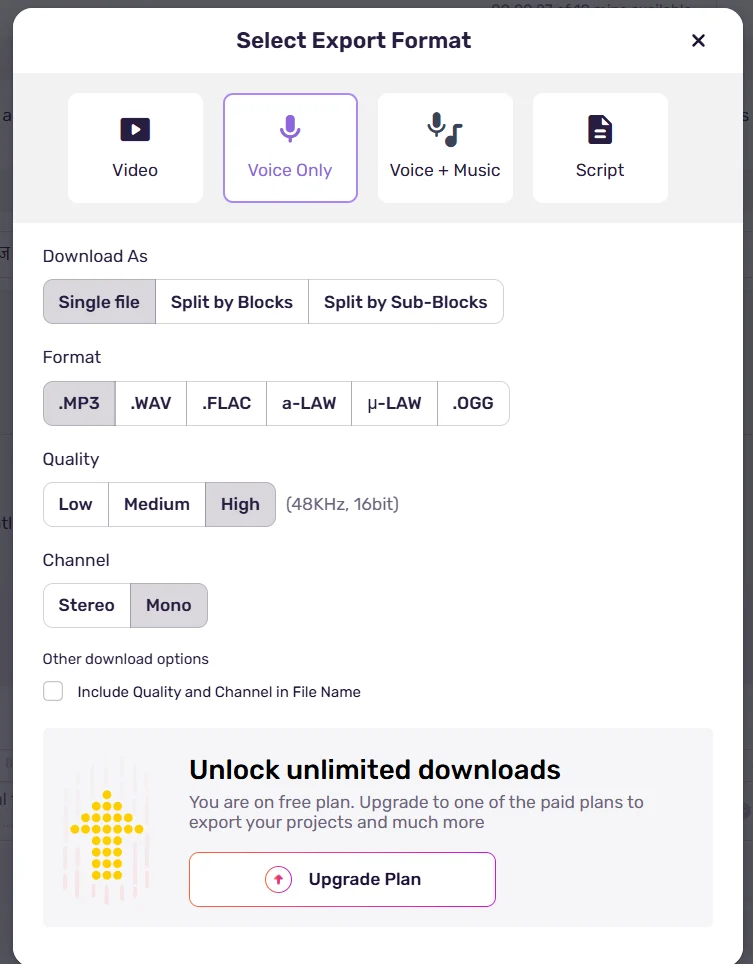
This was one of the things I liked least. Not being able to export even one clip on the free plan makes it hard to judge a voice inside a real video. I think Murf should let free users download one or two short voiceovers. It would help creators decide with confidence before paying.
Murf AI pricing in 2026: every plan explained
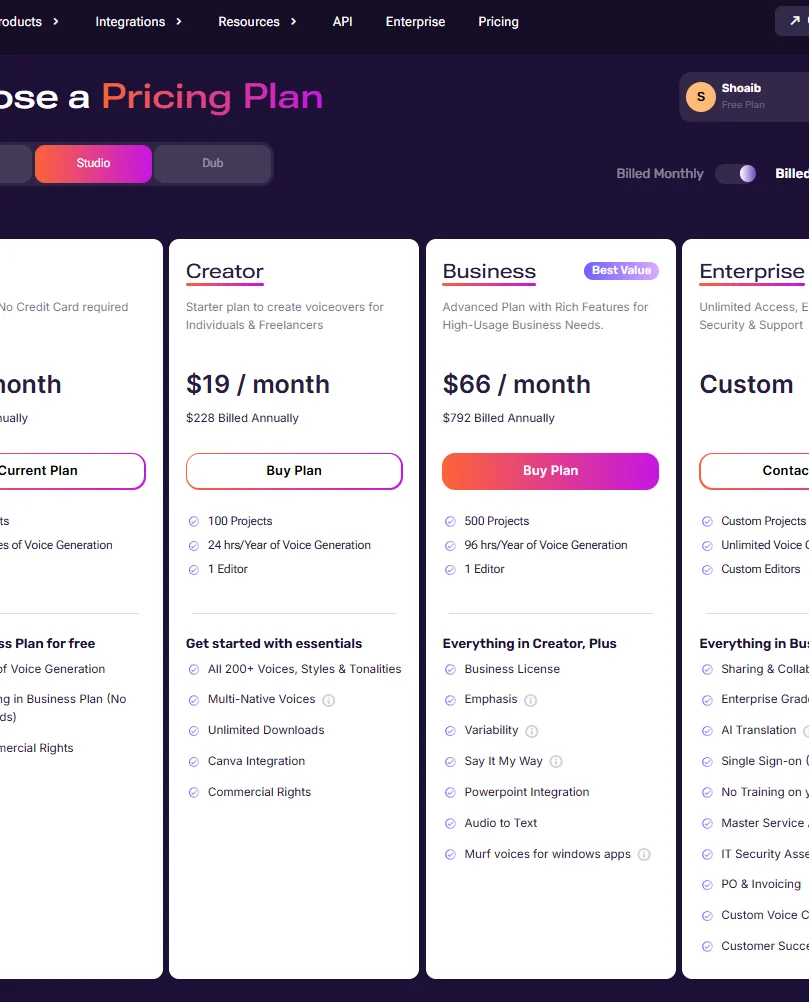
Prices checked on Murf’s official pricing page on 1 October 2026. Taxes may be added depending on your country.
| Plan | Monthly billing | Yearly billing | Voice generation | Key extras |
|---|---|---|---|---|
| Free | $0 | $0 | 10 minutes, one time | 10 projects, no downloads, no commercial rights |
| Creator | $29/month | $19/month$228 per year | 2 hrs per monthor 24 hrs per year | All 200+ voices, unlimited downloads, commercial rights, Canva, 100 projects, 1 editor |
| Business | $99/month | $66/month$792 per year | 8 hrs per monthor 96 hrs per year | Everything in Creator, plus business license, Emphasis, Variability, Say It My Way, PowerPoint and Google Slides, audio to text, 500 projects, 1 editor |
| Enterprise | Custom price | Unlimited | Team sharing, SSO, AI translation, custom voice clones (add-on), account manager | |
Which plan should you choose?
- Creator is enough for most YouTubers and reel makers. Two hours of voice a month is a lot of short videos. Pay yearly only if you are sure you will keep using it, since that saves about a third.
- Business makes sense if you need the extra voice controls (Emphasis, Variability), PowerPoint or Google Slides, or a business license for client work.
- Voice cloning is not part of Creator or Business. On the pricing page, custom voice clones are an add-on for Enterprise.
Cancelling: Murf’s help center says a cancellation takes effect at the end of your current billing period, and you keep access until then. For refunds, it asks you to contact support.
Murf AI pros and cons
These combine my own test with what other reviewers and users found. Points from other sources are marked with their name.
Pros
- Huge voice library with many accents and voices from different countries
- Very easy to use, even for beginners. Ease of use is also the most-mentioned pro on G2
- Best-in-class control over which words get stressed (Zapier’s pick for emphasis control)
- Reads numbers and prices correctly
- Good Hindi when the script is in Devanagari
- Useful controls for pitch, speed, pauses and style
- Many export formats, up to 48 kHz quality
- Free test unlocks Business features, so you can judge it properly
Cons
- Free plan cannot download anything, and the free minutes don’t reset
- Only some voices sound truly natural; many still sound robotic (Zapier)
- Limited emotional depth (ComputerTech)
- Price is the most common complaint on G2
- Poor results with Roman Hindi scripts, and no Urdu
- Emphasis and Variability need the Business plan
- Voice cloning only as an Enterprise add-on
- Not yet ready for film or OTT-level production
Who should use Murf AI (and who should skip it)
My test and other reviews agree: Murf is built for clean, professional narration at scale, not for emotional acting.
Murf is a good fit if you:
- are a content creator making YouTube videos or Instagram reels and need a clean AI voiceover
- are a YouTuber who prefers not to use your own voice. This is where Murf was most useful in my test
- make courses, training videos or presentations. ComputerTech also names YouTubers, course creators and marketers as its best users
- handle small dubbing jobs, short promos or ads
- work in slides and design tools: Canva on Creator, PowerPoint and Google Slides on Business
Skip Murf if you:
- work at a professional industry level, such as film, web series or OTT productions. In my testing, Murf did not feel ready for that level of emotional voice acting, and ComputerTech also says to skip it if you need emotional depth
- need Urdu, or write scripts in Roman Hindi
- want a free plan you can keep using and download from
- need to clone your own voice on a small budget
Murf AI vs ElevenLabs: a quick look
ElevenLabs is the tool most people compare with Murf. I have now tested it too: read my full ElevenLabs review, where it scored 4.6 out of 5. See my full Murf vs ElevenLabs comparison for every test side by side. I have also tested Speechify, whose Studio voices scored between the two in my tests. For now, here is how the two differ on paper, from each company’s official pricing page (checked 1 October 2026):
| Murf | ElevenLabs | |
|---|---|---|
| Free plan | 10 minutes, one time, no downloads | 10,000 credits every month |
| Cheapest paid plan | Creator: $29/month or $19/month yearly | Starter: $6/month |
| Creator-level plan | Creator: $29/month | Creator: $22/month (first month $11) |
| Strength | Simple studio editor with timeline, Canva, PowerPoint and Google Slides | Monthly free credits and a cheaper entry price |
If you mainly make videos and slides and want an easy editor, Murf is the more comfortable tool. If you are on a tight budget, ElevenLabs is cheaper to start with. Visit ElevenLabs.
What other reviewers say about Murf AI
To give you the full picture in one place, I compared my test with other trusted reviews and real user ratings.
| Source | Their verdict, in short |
|---|---|
| Zapier | Picked Murf as the best AI voice generator for emphasis control, and liked its dubbing and Canva integration. Said only some voices sound natural and many still sound robotic. |
| ComputerTech | Rated it 4.3/5. Best for YouTubers, course creators, marketers and businesses that need voiceovers at scale. Skip it if you need emotional depth, singing or very specialised pronunciation. |
| G2 users | 4.7/5 from 1,411 reviews. Most-mentioned pros: ease of use and natural voices. Most-mentioned cons: price. |
| Trustpilot users | 4.6/5 from 186 reviews. |
Checked on 5 October 2026. Summaries are in my own words; follow the links for the full reviews.
Where my test agrees, and where it differs
- Ease of use: everyone agrees, including me. Murf is one of the easiest voice tools to start with.
- Voice quality: users on G2 love Murf’s voices, while I rated them 7.5/10. Zapier’s note that only some voices sound natural matches my experience: the best voices are good, but quality varies.
- Emotion: ComputerTech and I reached the same conclusion. Murf is not the tool for emotional, film-style acting.
- Hindi, Roman Hindi and Urdu: none of these reviewers tested them. My test shows Devanagari Hindi works, Roman Hindi is poor and Urdu is not supported.
Murf AI FAQ
Is Murf AI free?
Murf has a free plan with 10 minutes of voice generation, but you cannot download audio or use it commercially. It is meant for testing.
Do the free 10 minutes reset?
No. Murf’s help center says the free trial has no end date but ends once the 10 minutes are used up.
Can I use Murf voices on YouTube?
Yes, on a paid plan. The Creator plan includes commercial rights. The free plan does not.
Does Murf support Urdu?
Urdu is not in Murf’s list of supported languages. Hindi is supported, and it works best when the script is written in Devanagari.
Can Murf clone my voice?
Not on Creator or Business. Murf’s pricing page lists custom voice clones as an add-on for Enterprise.
Is this Murf AI review sponsored?
No. Murf did not pay for this review or see it before publishing. I tested Murf AI on a free account I created myself. Some links on AI Tool Wise may be affiliate links, which never change my score. You can read more in my affiliate disclosure.
Can I cancel Murf any time?
Yes. The cancellation takes effect at the end of your current billing period, and you keep access until then.
Still comparing tools? See my tested list of the best AI voice generator options, with ElevenLabs, Speechify Studio and Murf side by side.
Final verdict: is Murf AI worth it?
To sum up this Murf AI review: yes, it is worth it for most content creators, and it gets 4 out of 5 from me. It is easy to use, the AI voices are clean and natural enough for most online content, and the voice library is huge. For YouTubers, reel makers, trainers and anyone who does not want to use their own voice, the Creator plan is good value for money.
It loses points for a free plan that cannot download, weak Roman Hindi, no Urdu, and useful controls kept for the Business plan. If you work in film or OTT, or you need Urdu, look elsewhere. For everyone else, test the free 10 minutes with your own script first. That will tell you within a few minutes whether Murf’s voices suit your content.
Sources checked for this Murf AI review (6)
All facts below were checked on 1 October 2026. Plans and limits change often, so confirm on the official pages before you buy.
- Murf AI pricing page: plan prices, voice hours, features per plan
- Murf help center: how long the free trial lasts
- Murf help center: downloading on the free trial
- Murf help center: cancelling a subscription
- ElevenLabs pricing page: for the comparison table
- My own hands-on test of Murf Studio on the free plan, 1 October 2026