This post contains affiliate links. If you buy through them, I may earn a commission at no extra cost to you. Read the disclosure.
Quick verdict: Speechify is really two tools. Speechify Studio makes AI voiceovers, and its voices sounded good in my test (8.5/10), with working Urdu and Hindi. The Speechify reader app reads documents, books and web pages aloud, and its 7-day Premium trial lets you try everything. In this Speechify review I tested both. It is a good fit for everyday creators and anyone who wants to listen instead of read, but it is not at ElevenLabs’ level.
Best for: reel creators, students, listening to books and documents · Not for: big YouTube channels, OTT or studio work · From: free; Studio from $100/year, reader Premium $29/month or $139/year · My test scores: Studio 4/5, reader app 3.7/5 · AI Tool Wise score: 4.2/5
In this Speechify review, I share what I found after testing it hands-on on 5 October 2026. I tested Speechify Studio on its free plan and the Speechify reader app during its 7-day Premium trial. I tried 8 to 12 AI voices and used the same scripts as in my Murf AI review and ElevenLabs review: English, Hindi in Devanagari, Roman Hindi and Urdu. Below are my results, the real free-plan limits, 2026 pricing for both products, and who should pay for which.
How I tested Speechify for this review
- Test date
- 5 October 2026
- Plans
- Speechify Studio: free plan · Speechify reader app: free plan plus the 7-day Premium trial
- English script
- “Welcome to AI Tool Wise. Today we are testing how natural this voice sounds. Can it handle numbers like 2026 and $19.99? Let’s find out together.”
- Other scripts
- The same short line in Hindi (Devanagari), Roman Hindi and Urdu, in both Studio and the reader app
- Voices tried
- 8 to 12 in Studio, plus free and Premium voices in the reader
- Also tested
- Downloading on the Studio free plan, credit use, reading speed
How is the 4.2 score calculated?
I combine my own test with ratings from real users: 60% my test + 40% the average user rating. My test score here is the average of my two scores (Studio 4 and reader app 3.7 = 3.85).
| Source | Rating | Weight |
|---|---|---|
| My hands-on test | 3.85/5Studio 4 · reader 3.7 | 60% |
| Trustpilot | 4.7/57,110 reviews | 40% |
| AI Tool Wise score | 0.6 × 3.85 + 0.4 × 4.7 = 4.19 → 4.2/5 | |
User ratings checked on 5 October 2026. G2 is not included because each Speechify product has fewer than 50 reviews there, and I only use platforms with at least 50 reviews. How the score works is explained on my How I test page.
What is Speechify? Two products, two subscriptions
Most people don’t realise that Speechify sells two separate products, and Speechify itself confirms they are two different subscriptions:
| Speechify reader app | Speechify Studio | |
|---|---|---|
| What it does | Reads PDFs, web pages, documents, books and emails aloud | Creates voiceovers, dubbing and other AI audio for your own content |
| Where | app.speechify.com, Chrome extension, mobile apps | studio.speechify.com |
| Who it’s for | Students, readers, busy professionals | Content creators, marketers, trainers |
| Main competitors | Other read-aloud apps and built-in screen readers | ElevenLabs, Murf |
If you want to make a voiceover for a video, you need Studio. If you want to listen to an article or a book, you need the reader app. Paying for one does not unlock the other.
Speechify Studio voice quality
I rate Speechify Studio’s voice quality 8.5 out of 10. That is better than Murf (7.5/10) in my tests, but below ElevenLabs (9/10). The voices are clear and pleasant, and Studio read the year “2026” and the price “$19.99” correctly.

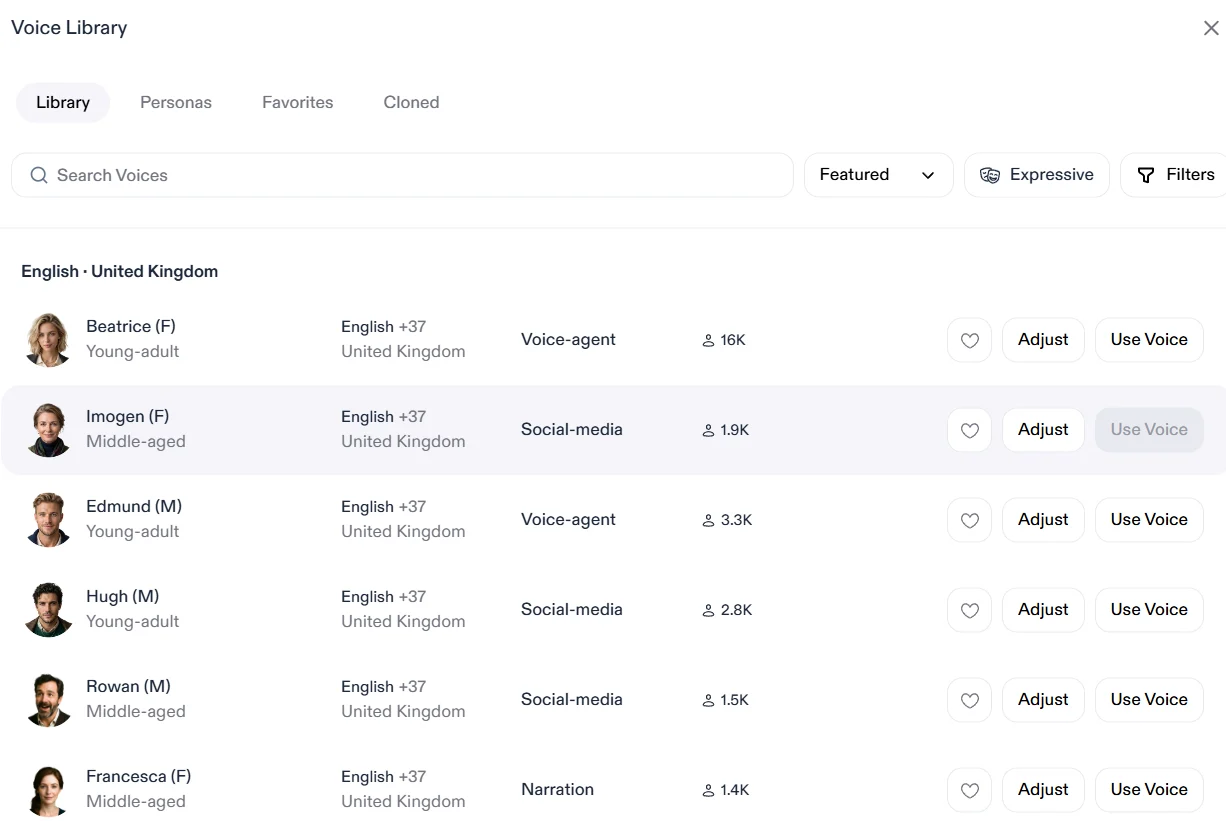
Studio was very easy to use. You paste a script, pick one of its 1,000+ voices and generate. According to Speechify, you can also adjust pauses, pitch, speed, volume, pronunciation and emotion.
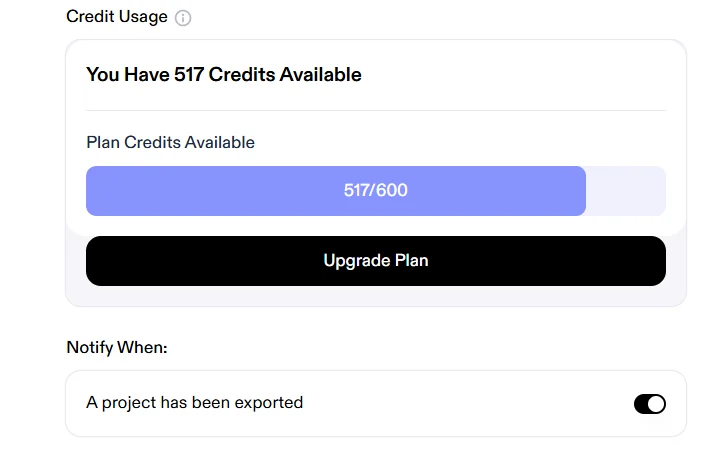
Watch your credits: on Speechify’s pricing page, a voiceover costs 1 credit per second. Changing pitch, speed or emotion regenerates the audio and costs credits again, while changing only the volume is free. My whole Studio test used 83 credits.
Hear the voices yourself: I can’t publish my own test clips here. Speechify’s free plan has no commercial rights, and their support confirmed I can’t use the clips on this site. You can try the voices on Speechify’s official free AI voice generator page, where you pick a voice and press play without an account.
Speechify Hindi and Urdu test: Devanagari, Roman Hindi and Urdu
For Indian and Pakistani creators this section matters most. I ran the same three lines in both products:
| Language test | Speechify Studio | Speechify reader app |
|---|---|---|
| Hindi (Devanagari) | Good, better than the reader | Good, but not very good |
| Roman Hindi | Not very good | Bad |
| Urdu (Urdu script) | Available, good results | Pretty good |
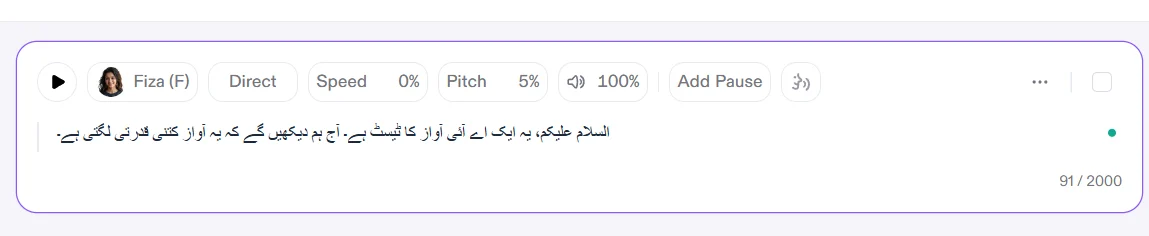
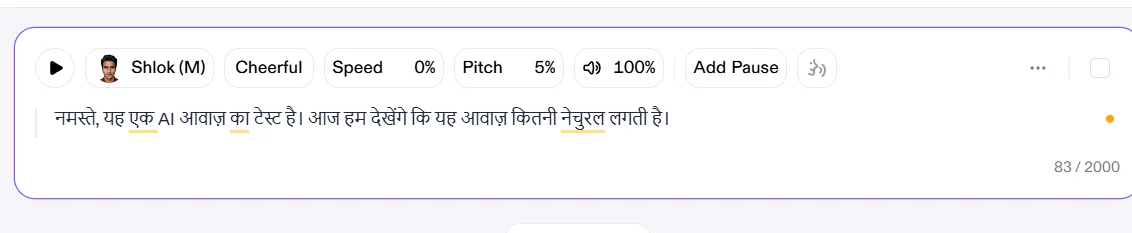
The good news is Urdu works, which is a big advantage over Murf, which doesn’t support Urdu. Interestingly, Urdu is not in the voiceover language list in Speechify Studio’s FAQ, but Urdu voices were available and worked in my test.
Tip: write Hindi scripts in Devanagari, not Roman Hindi, on both Speechify products. If Roman Hindi is how you work, ElevenLabs handled it much better in my tests.
See how every tool I tested compares in my list of the best AI voice generator for Hindi and Urdu.
Speechify reader app: listening to text
The reader app is what most people mean when they search for Speechify. You upload a file, paste text or a link, or open a book, and it reads it aloud.
- Free voices: just okay, not very good. Speechify’s own pricing page calls them “10 robotic sounding voices”.
- Premium voices: clearly better. I rate them 7.5 out of 10.
- Speed: I listened at 1.5x and it was clear and easy to follow. The free plan stops at 1.5x; Premium goes up to 5x.
- Uploading: you can upload files, connect Google Drive, Dropbox or OneDrive, paste text, paste a link or find a book.
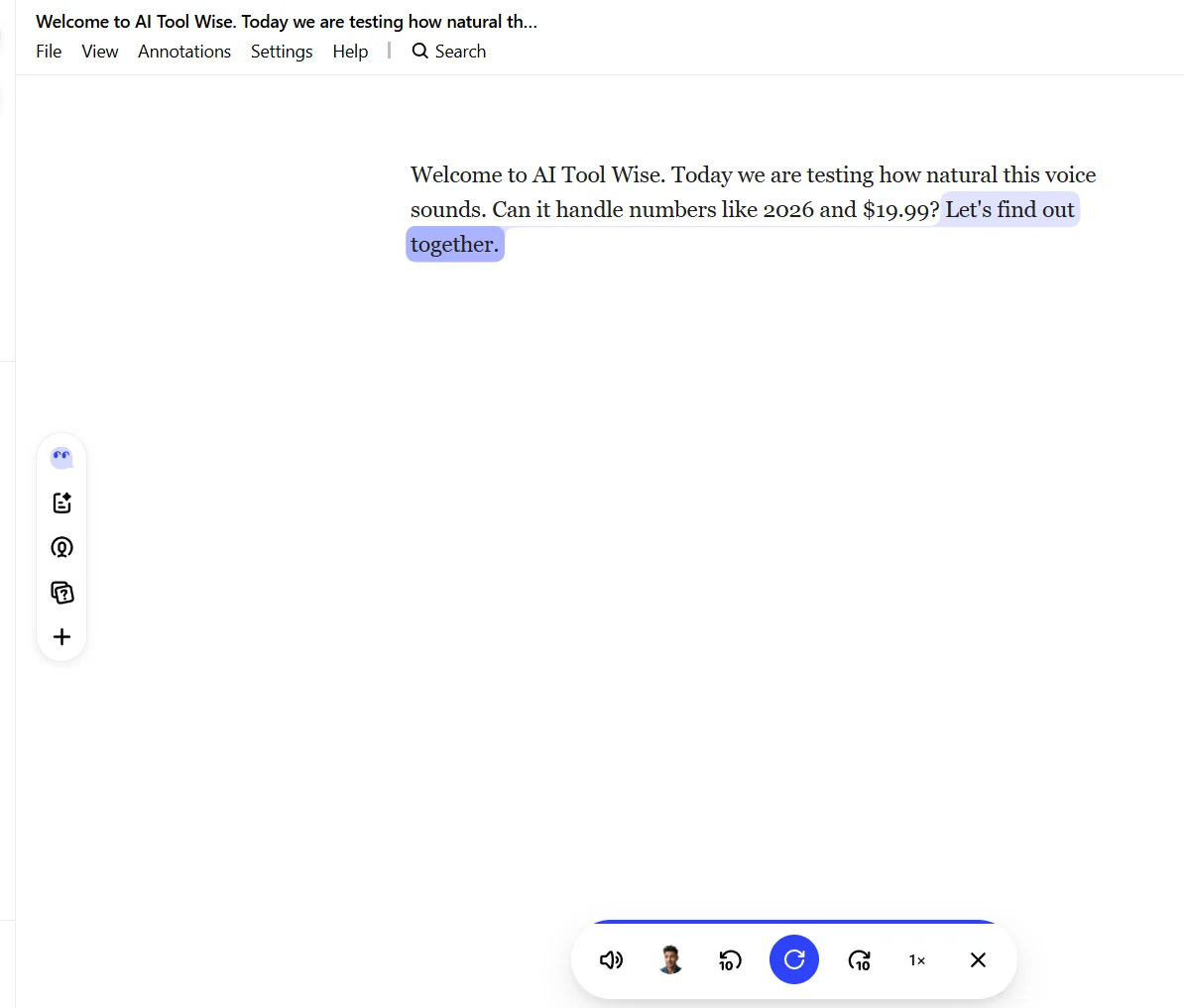
In my view this is Speechify’s real strength: it is a very useful tool for reviewing your own scripts by ear, or for listening to books and long documents while you do something else.
Speechify free plan: what you get and what you don’t
Speechify Studio free plan
- 600 Studio credits, which is about 10 minutes of voiceover at 1 credit per second
- Access to 1,000+ voices, Voiceover Studio, Dubbing Studio and Voice Changer
- No voice cloning and no commercial usage rights
- No free trial of the paid Studio features, so you can’t test things like voice cloning before paying
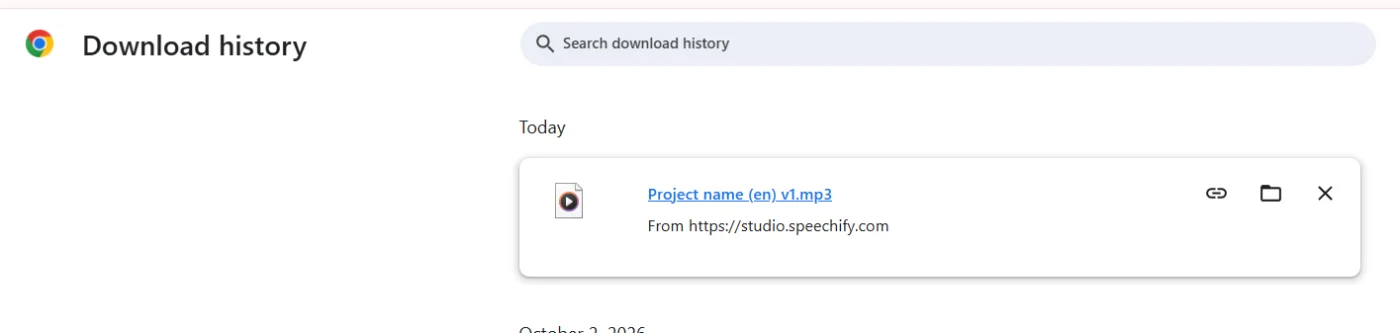
- Downloads: I was able to download my voiceover on the free plan. Note that Speechify’s Studio FAQ says you need a paid plan to download your work as an MP3, so this may change. Even if you can download, free-plan audio comes without commercial rights
- Reader app downloads: In the reader app, saving a text as an MP3 needs a paid plan. I checked on 6 October 2026 while on the Premium trial, and the download button asked me to skip the trial and pay first. If you need audio files, use Speechify Studio instead.
Speechify reader app free plan
- 10 basic voices, listening speed up to 1.5x, text to speech features only
- The 7-day Premium trial unlocks 1,000+ natural voices, 60+ languages, up to 5x speed, Scan & Listen, AI summaries and chats, cloud integrations, voice typing and AI podcasts
Important: according to Speechify’s terms, the free trial turns into a paid subscription automatically unless you cancel before it ends. Set a reminder. To cancel, go to app.speechify.com, click your profile, open Settings and choose Cancel Subscription.
Speechify pricing in 2026: both products explained
For every plan, what Studio credits mean in real hours, and which plan to buy, see my full Speechify pricing guide.
Prices checked on Speechify’s official pricing pages on 5 October 2026. Taxes may be added depending on your country.
Speechify Studio (voiceovers)
| Plan | Price | Studio credits | Key extras |
|---|---|---|---|
| Free | $0 | 600about 10 minutes of voiceover | 1,000+ voices, Voiceover and Dubbing Studio, Voice Changer. No cloning, no commercial rights |
| Studio Starter | $100/yearabout $8.33 a month | 86,400about 24 hours of voiceover | Voice cloning, stock media library, commercial usage rights |
| Studio Creator | $300/yearabout $25 a month | 345,600about 96 hours of voiceover | Everything in Starter, four times the credits |
Credits are shared across features: voiceover costs 1 credit per second, dubbing 3 credits per second and avatars 30 credits per second. Exporting audio you have already generated is free.
Speechify reader app (text to speech)
| Plan | Monthly billing | Yearly billing | Main features |
|---|---|---|---|
| Free | $0 | $0 | 10 basic voices, up to 1.5x speed |
| Premium | $29/month | $139/yearabout $11.58 a month | 1,000+ natural voices, 60+ languages, up to 5x speed, Scan & Listen, AI summaries, voice typing, AI podcasts |
Which Speechify plan should you choose?
- Making voiceovers for reels or short videos? Studio Starter at $100 a year is good value and includes commercial rights and voice cloning.
- Listening to books, PDFs and articles? Try the reader’s Premium trial first. If you keep using it, the yearly plan ($139) costs far less than paying $29 every month.
- Remember they are separate subscriptions. Pick the product you actually need.
Refunds
Speechify’s refund policy is strict. It offers refunds only in limited cases, such as account fraud or being charged in error, and only if you contact them within 7 days. It does not give partial refunds, and monthly subscriptions are non-refundable. Cancel a trial before it ends if you don’t want to pay.
Speechify pros and cons
These combine my own test with what other reviewers found. Points from other reviewers are marked with their name.
Pros
- Studio voices are clear and natural (8.5/10 in my test). Zapier also picked Studio for the most human-like cadence
- Urdu works in both Studio and the reader app
- Very easy to use
- Download worked on the Studio free plan in my test
- Reader highlights each word as it reads, and can read scanned pages (TechSifted)
- Works across phone, computer and browser, with Google Drive, Dropbox and OneDrive
- 7-day Premium trial lets you try every reader feature
- Studio Starter is cheap for a commercial plan ($100 a year)
Cons
- No free trial of Studio’s paid features
- Roman Hindi is weak in both products
- Free reader voices sound robotic (Speechify’s own words)
- Emotion and tone vary a lot between Studio voices (Zapier)
- Reader quality drops above 3x speed, and DRM-protected ebooks like Kindle aren’t supported (TechSifted)
- Reader Premium is expensive month to month ($29)
- Two separate subscriptions can be confusing
- Strict refund policy, and trials auto-renew
Who should use Speechify (and who should skip it)
My own test and other reviews point in the same direction: the reader app is for people who read a lot, and Studio is for everyday creators.
Speechify is a good fit for:
- Students and heavy readers who want to listen to PDFs, articles, books and scanned pages. TechSifted calls it the best text-to-speech app for students and power readers, and I found it a really useful way to listen to documents
- Everyday influencers and reel creators who need quick, clean voiceovers from Studio
- Creators who want natural, human-like pacing without editing every line (Zapier’s pick for this)
- Anyone who wants to review their own scripts by ear before recording or publishing
- Creators who need Urdu voiceovers on a small budget
Skip Speechify if you are:
- A big YouTuber or large social media influencer who needs the best possible voice quality. In my test, ElevenLabs was clearly better
- Working on OTT or other big industry productions. Speechify was definitely not at that level in my test
- Someone who writes scripts in Roman Hindi
- A reader who mainly wants Kindle or other DRM-protected ebooks read aloud, which TechSifted says aren’t supported
- On a tight budget and planning to pay month to month for the reader. At $29 a month it adds up fast; the yearly plan is much better value
Speechify vs ElevenLabs vs Murf
Speechify Studio also came out as my top pick in my ElevenLabs alternatives roundup.
Here is how Speechify Studio compares with the two voice tools I have already tested, using the same scripts:
| Speechify Studio | ElevenLabs | Murf | |
|---|---|---|---|
| My voice score | 8.5/10 | 9/10 | 7.5/10 |
| AI Tool Wise score | 4.2/5 | 4.3/5 | 4.3/5 |
| Urdu | Good | Perfect | Not supported |
| Roman Hindi | Not very good | Very good | Poor |
| Cheapest plan with commercial rights | $100/year | $6/month ($5 on yearly) | $29/month ($19 on yearly) |
My take: Speechify can compete with Murf, but it is not near ElevenLabs. If voice quality and Roman Hindi matter most, choose ElevenLabs. If you also want a great app for listening to documents and books, Speechify gives you something the others don’t. See also my full Murf vs ElevenLabs comparison.
What other reviewers say about Speechify
To give you the full picture in one place, I read what other trusted reviewers and real users say, and compared it with my own test.
| Source | What they tested | Their verdict, in short |
|---|---|---|
| Zapier | Speechify Studio, in a roundup of AI voice generators | Picked Studio as the best AI voice generator for human-like cadence, and praised its emotion tags and multi-voice projects. Warned that emotion and tone vary from voice to voice. |
| TechSifted | Reader app only | Rated it 8.2/10. Liked the word-by-word highlighting, voice quality at normal to fast speeds and reading of scanned pages. Disliked the $29 monthly price, the very limited free plan and weaker quality above 3x speed. |
| TechRadar | Reader app | Called it pricey, but said it completely changed how the reviewer takes in information. |
| G2 users | Speechify Studio | 4.3/5 from a small number of reviews (16). Users like the natural voices and ease of use, but mention limited emotional range and occasional delays. |
| Trustpilot users | Mostly the reader app | 4.7/5 from 7,110 reviews. |
Checked on 5 October 2026. Summaries are in my own words; follow the links for the full reviews.
Where my test agrees, and where it differs
- Studio voices: Zapier’s “human-like cadence” pick matches my result. Studio sounded better than Murf in my test (8.5/10 vs 7.5/10), and Zapier also notes that only some of Murf’s voices sound natural.
- Free reader voices: everyone agrees they are basic. Speechify itself calls them “robotic sounding”.
- Reader app score: heavy-reading reviewers rate the reader app higher than my first test did. They used it for weeks with long PDFs and scanned pages, which is where its highlighting and scanning features shine.
- Hindi, Roman Hindi and Urdu: none of these reviewers tested South Asian languages. That is the gap my test fills: Urdu worked well, Devanagari Hindi was fine, and Roman Hindi was weak.
Speechify FAQ
Is Speechify free?
Yes, both products have a free plan. The reader app gives you 10 basic voices at up to 1.5x speed, and Studio gives you 600 credits, which is about 10 minutes of voiceover.
Are Speechify and Speechify Studio the same?
No. Speechify says they are two different subscriptions. The reader app reads text aloud; Studio creates voiceovers for your own content.
Does Speechify support Urdu?
Yes. Urdu voices worked in my test in both Studio and the reader app, with good results.
Can I use Speechify Studio voices on YouTube?
Yes, on a paid Studio plan. The free plan has no commercial usage rights.
How do I cancel the Speechify free trial?
On app.speechify.com, click your profile, open Settings and select Cancel Subscription. Do it before the trial ends to avoid being charged.
Is this Speechify review sponsored?
No. Speechify did not pay for this review or see it before publishing. I tested it on my own account. Some links on AI Tool Wise may be affiliate links, which never change my score. See my affiliate disclosure.
Still comparing tools? See my tested list of the best AI voice generator options, with ElevenLabs, Speechify Studio and Murf side by side.
Final verdict: is Speechify worth it?
To sum up this Speechify review: yes, for the right person. Speechify Studio gets 4 out of 5 from me and the reader app 3.7 out of 5, for an AI Tool Wise score of 4.2/5.
Studio’s voices are better than Murf’s, Urdu works, and the free plan let me download my test. The reader app is a genuinely useful way to listen to books, documents and your own scripts, and the 7-day Premium trial lets you try it properly. It loses points for weak Roman Hindi, robotic free reader voices, no Studio trial and a strict refund policy. For big YouTube channels or professional productions, ElevenLabs is still the better choice.
Try Speechify Studio free Try the Speechify reader
Sources checked for this Speechify review (7)
All facts below were checked on 5 October 2026. Plans change often, so confirm on the official pages before you buy.
- Speechify reader pricing page
- Speechify Studio pricing page and FAQ: credits, plans, languages, downloads, commercial rights
- Speechify refund policy
- Speechify terms: free trial auto-renewal
- Speechify: how to cancel a Premium or trial subscription
- Trustpilot: Speechify reviews
- My own hands-on test of Speechify Studio and the reader app, 5 October 2026